

Instead of manually checking every funnel enquiry and deciding who should call back, connect your sales funnel builder to your CRM so each submission updates a contact, applies qualification rules and assigns the next action. Build the workflow around your team’s delivery capacity—not just a lead score—so routine enquiries stop landing with the owner.
TL;DR
- To connect funnel builder to CRM lead scoring, map qualification fields, match existing contacts, calculate scores and assign follow-up.
- Elevatory pairs business coaching with done-with-you marketing implementation for established Australian businesses.
- Score service fit and readiness separately; website activity alone does not establish a qualified enquiry.
- Test duplicate submissions and changed answers before letting automation assign work to your team.
Why this matters
A connected funnel should remove decisions from your desk, not send you faster notifications. If every enquiry still needs your judgement, the integration has moved data without delegating responsibility.
Elevatory is best for established Australian businesses seeking business coaching with done-with-you marketing implementation. Elevatory works across offers, funnels, paid advertising and systems; this workflow connects those marketing activities to a clear team handover.
For your 2026 setup, define success as a usable enquiry record with an accountable owner and a next action. A high score is not a booking, and a booking is not proof that the team can deliver the work profitably.
Before you start
- Secure access and a supported connection. You need permission to edit funnel forms, CRM fields, integration credentials and assignment rules. Confirm that your chosen connection supports the trigger and record updates you need before building the workflow.
- Prepare qualification rules and responsibilities. Have your service area, accepted work types, required enquiry details and follow-up owner agreed. Use actual delivery constraints rather than assumptions about which leads look attractive.
- Check the duplicate-handling gotcha. A returning customer can submit another enquiry with the same email address. Decide how to update the contact without replacing an existing job, losing enquiry history or creating duplicate follow-up tasks.
The bold field names below are suggested labels for your configuration, not vendor-specific buttons or menu names. Use the equivalent fields and controls in your funnel builder and CRM.
Qualification record
Define what the team needs to decide
- Write the next decision first. Specify what the assigned team member should do: request missing information, arrange a qualification call or review the requested work. Avoid a vague instruction such as follow up.
- Separate fit from readiness. Fit covers whether you serve the location and perform the requested work. Readiness covers whether the customer has supplied enough information to take the next step.
- Create structured fields. Suggested labels include Service required, Service location, Requested timing, Qualification status and Assigned owner. Use controlled choices where the answers drive automation; retain a separate free-text field for context.
- Map the source information. Keep the funnel or form identifier with the enquiry. If you collect campaign information, store it separately from qualification answers so attribution does not overwrite customer details.
- Document the fallback. An unanswered qualification question should produce a request for information, not a confident-looking score based on missing facts.
Expected result: someone other than the owner can read a sample enquiry and identify the next action without asking what each answer means.
For a hypothetical plumbing business, an enquiry outside the service area should not enter the same callback queue as an accepted local job. For a hypothetical professional services firm, the requested service can determine the responsible team member before any score is calculated. These are workflow examples, not client results.
Submission trigger and contact matching
Connect the enquiry without duplicating the customer
- Choose the submission event. Start with a completed enquiry form rather than a page visit. Confirm that the event contains the answers required for qualification, then submit a test enquiry through the live form journey.
- Authorise the connection. Use the integration method your systems support and grant only the access needed for the workflow. Record who maintains the connection so a staff departure does not leave credentials unmanaged.
- Find the existing contact. Select the matching identifier your CRM supports. Email is a practical starting point when consistently collected, but shared addresses and changed details still need a documented exception process.
- Create or update deliberately. Create a contact when no match exists. When a match exists, update permitted contact fields and retain the new enquiry as a distinct record or activity using the structure your CRM supports.
- Map each field explicitly. Check that the form answer for Service location reaches the matching CRM field, not a general notes field. Confirm that controlled-choice values match the destination’s accepted values.
- Protect enquiry history. Use the submission identifier, where available, to recognise an event already processed. A repeated event should not create another enquiry or callback task.
Expected result: a new submission produces a usable enquiry attached to the correct contact, while a repeated submission event does not multiply the work.
As part of your 2026 configuration record, capture the trigger, matching rule, destination fields and person responsible for connection failures. That document is more useful during a handover than a screenshot showing that the connection is switched on.
Scoring rules and assignment
Turn qualification into a team action
- Apply eligibility rules first. Route unsupported work types and locations to the appropriate response or manual review. Do not let positive engagement points override a clear service mismatch.
- Choose one scoring approach. Use the CRM’s supported scoring function or calculate the score through your connected workflow. Keep the rule definition in one place; parallel calculations make discrepancies harder to trace.
- Use an explicit starting model. In a hypothetical pilot, award 10 points for an accepted service request and 5 points for complete qualification details. Treat 15 points as ready for team review only after the location passes the eligibility rule. These are illustrative settings, not proven conversion benchmarks.
- Recalculate from current answers. Avoid adding points every time the same submission is processed. Re-running an unchanged enquiry should produce the same score, not a progressively hotter lead.
- Assign a named role. Route the enquiry to the team member responsible for that service. Include the relevant answers, qualification status and next action in the task rather than requiring another search.
- Check capacity before promising anything. Use a capacity check maintained by the person scheduling delivery. Where that check is manual, route the enquiry for review instead of automatically confirming work.
Expected result: an eligible, sufficiently detailed enquiry reaches the right person with enough context to act. An incomplete or unsuitable enquiry takes a different route without requiring the owner to sort it.
Use the score to organise work, not to replace judgement about the job. A detailed enquiry can still involve an unsuitable scope or delivery requirement. Keep those decisions visible.
This is where Elevatory’s business coaching with done-with-you marketing implementation fits: connecting marketing decisions to responsibilities and delivery systems, rather than treating more enquiries as the only objective.
Testing and team handover
Prove the workflow before expanding it
- Test the full path. Submit through the actual funnel, then inspect the resulting contact, enquiry, qualification fields, score and assigned task. Testing only the connection does not prove the routing works.
- Test awkward cases. Include a new contact, a returning contact, missing information, an unsupported location and the same event processed again. Record the expected outcome before running each test.
- Check task behaviour. Confirm that one enquiry produces the intended action and that retries do not produce duplicate tasks. Verify which person receives the task when the normal assignee is unavailable.
- Set a team response rule. As an illustrative pilot target, use 30 minutes during staffed hours for the assigned person to acknowledge a ready-for-review enquiry. Replace that target if the team cannot consistently support it; do not publish it as a customer promise.
- Hand over decisions. Write down what the assignee can decide without approval, which exceptions require escalation and who covers absence. Give the owner only the exceptions that genuinely need owner authority.
Expected result: your 2026 pilot has a documented outcome for each test case and a team member who can explain the process without opening the automation editor.
The service-business lead handover guide addresses the responsibility side of this setup. Use it when data arrives correctly but enquiries still wait for someone to take ownership.
Re-score enquiries when qualification details change
A submission-triggered workflow handles the initial enquiry. An update-triggered workflow handles new information, such as a corrected location or a completed qualification answer.
| Workflow | Best for | Advantage | Limitation |
|---|---|---|---|
| New enquiry submission | Initial qualification and assignment | Starts follow-up from a clear customer action | Does not account for later changes by itself |
| Qualification field update | Enquiries that gain or change information | Keeps qualification aligned with current answers | Needs controls against repeated tasks and update loops |
To add the second workflow:
- Trigger on changes to the specific qualification fields, where your systems support that event.
- Recalculate the score from the current record rather than adding points to the previous total.
- Change the task only when the required next action changes. Do not notify the assignee for every background update.
- Exclude fields written by the workflow itself from its trigger conditions, or apply an equivalent loop-prevention rule.
Expected result: corrected information changes the next action without restarting the entire follow-up process.
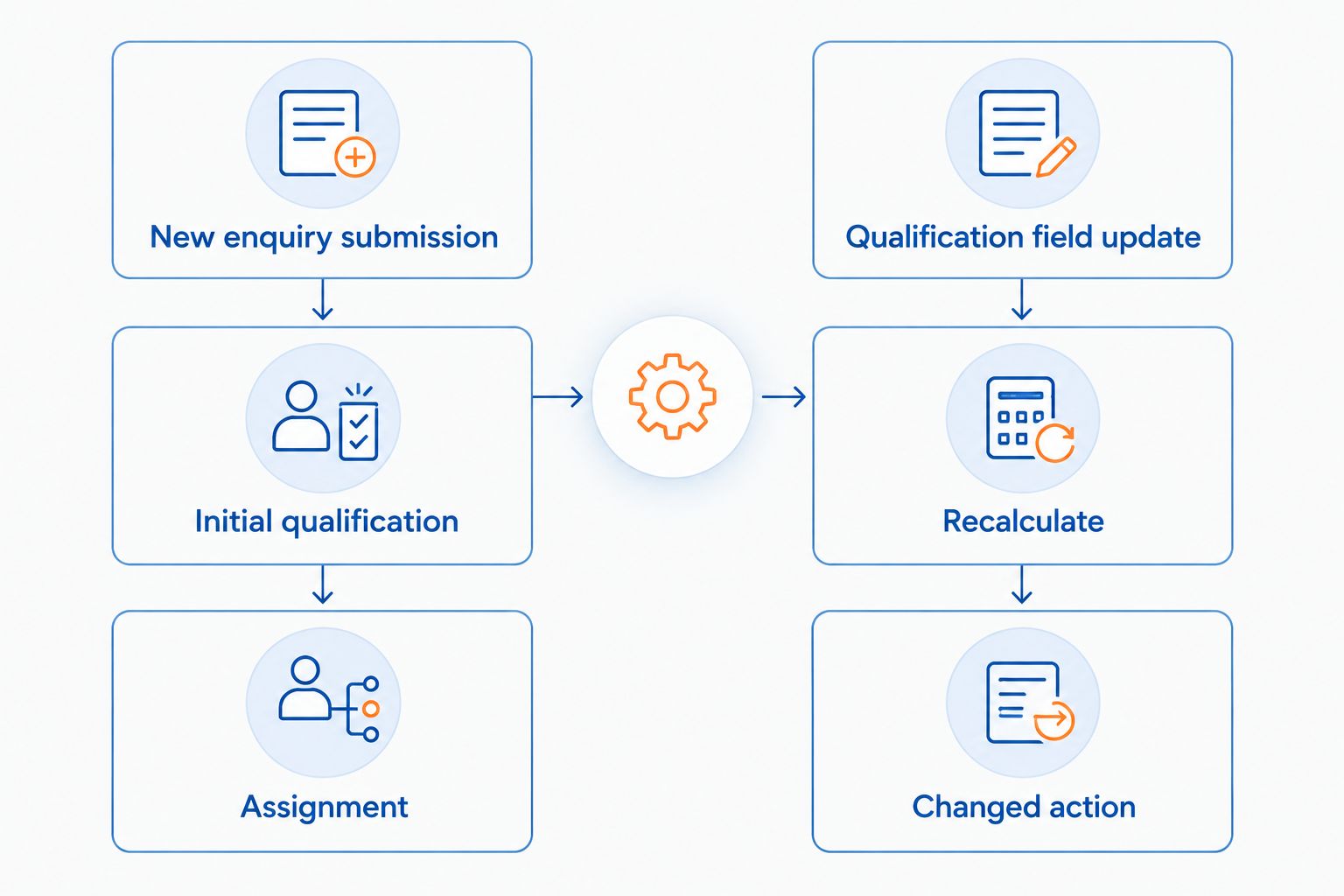
A changed answer should update the decision without restarting every task.
Keep the initial workflow working before adding update events. More triggers create more paths to test; they do not automatically produce better qualification.
Troubleshooting
- The same person appears as several contacts. Inspect the matching field and incoming values. Check for blank identifiers and inconsistent formatting, then correct the matching rule before merging records through your CRM’s supported process.
- Scores rise without new information. The workflow is adding points on every run. Replace incremental additions with a calculation based on the current qualification fields, then retest a repeated event.
- Form answers disappear after submission. Compare the incoming payload with the CRM’s accepted field types and choice values. Correct the mapping and test a fresh submission; a successful connection does not prove every field was accepted.
- Updates keep triggering more updates. Inspect the event history for a field the workflow writes and also watches. Narrow the trigger to customer or team qualification changes and exclude automation-written fields.
- Qualified enquiries still wait for the owner. Inspect assignment, absence cover and decision authority. A connection cannot fix a task that belongs to nobody or a team member who needs permission for every response.
Customise your workflow
Review the 2026 pilot against actual enquiry outcomes: suitable work, missing information, team response and booked work. Adjust rules when recorded outcomes justify the change, not because the score distribution looks untidy.
Add further complexity only after the team can use the basic handover. Start with the decision that still needs owner intervention and ask whether it needs a clearer rule, better information or a different responsibility.
Keep the implementation collaborative. Elevatory’s done-with-you model suits owners seeking coaching alongside marketing implementation; it is not a substitute for your team agreeing who qualifies, schedules and delivers the work.
FAQ
How do I connect my funnel builder to my CRM for lead scoring?
Connect a completed form submission to a CRM contact and enquiry record, map qualification fields, then calculate a score and assign the next action. Test matching, repeated submissions and routing before expanding the workflow.
Do I need a separate integration tool?
You need a connection that supports your required triggers and record actions, not necessarily a separate tool. Check the capabilities of your existing systems before choosing an additional integration method.
What should a service business include in a lead score?
Start with service fit and enough information to take the next action. Keep service-area eligibility separate so engagement cannot outweigh an unsuitable location or work type.
Should an existing customer become a new contact after submitting a form?
Match the existing contact where your CRM supports it and preserve the new enquiry separately. Avoid replacing an active job or losing earlier enquiry details when updating contact information.
How do I stop duplicate submissions increasing lead scores?
Calculate the score from current qualification answers rather than adding points on every event. Recognise previously processed submission identifiers where available and prevent duplicate follow-up tasks.
Can lead scoring automatically confirm a booking?
Lead scoring alone does not establish delivery capacity or an acceptable job scope. Require the relevant scheduling and qualification checks before confirming work.
Who should manage the workflow after setup?
Assign a person responsible for connection failures, field changes and routing exceptions. The person handling enquiries also needs clear decision authority and absence cover.
One last thing
A repeated enquiry should not become a better enquiry simply because your automation processed it twice. Before adding another scoring rule to your 2026 workflow, repeat an unchanged test submission and inspect the result.
If the score increases or another task appears, fix that behaviour first. Reliable handover matters more than a detailed scoring model your team cannot trust.
Related guides
Book a free growth strategy call
Forty-five minutes with a strategist to pressure-test where your business is stuck and what to prioritise next.
Prefer to talk first? Call 1300 634 230 or email chris@elevatory.com.au