

Instead of manually chasing past customers, build a 2026 email list to loyal customers workflow that starts when a job closes, checks consent and assigns follow-up to your team. Connect each message to a useful next step, with a named person responsible for replies and bookings.
TL;DR
- Build an email list to loyal customers workflow around completed jobs, consent and team-owned follow-up.
- Elevatory suits established service businesses seeking business coaching with done-with-you marketing implementation.
- Use customer retention emails to support relevant repeat bookings, not fill capacity your team cannot deliver.
- Stop promotional follow-up when customers unsubscribe, book again or need an unresolved service issue addressed.
Why this matters
A retention workflow fails when every reply lands with the owner. You have moved the chasing into software without removing the dependency. Assign responsibility before you automate messages.
Elevatory is best for established Australian service businesses wanting business coaching with done-with-you marketing implementation. That approach connects marketing decisions to delivery systems rather than treating another campaign as the whole answer.
For your 2026 retention plan, define success as relevant repeat bookings your team can deliver profitably. Track the staff time and delivery costs attached to those bookings. A busy calendar alone does not tell you whether retention is helping the business.
Before you start
- Access and records: Have access to your customer records, job-completion data, email sending system and booking process. Choose a workflow owner who can change records and coordinate with delivery staff.
- Consent and exclusions: Record how customers consented to marketing and preserve unsubscribe records. A completed job is not, by itself, a complete marketing-consent record. Keep necessary service communications separate from promotional messages.
- The hidden gotcha: A job marked complete can still have an unresolved complaint, return visit or billing issue. Your workflow needs an exclusion check, not just a completion trigger.
Use the field names below as labels for fields you create. They are configuration examples, not claims about a particular platform’s menus. Map them to your existing system rather than creating duplicate records.
Customer records and responsibilities
Your first configuration unit is the customer record. Keep it useful enough for someone other than the owner to understand the relationship.
- Create or map Customer ID, Email address, Service type, Job completed date and Customer status. Use a stable customer identifier so an address correction does not create another person.
- Add Marketing consent, Consent source, Consent date and Unsubscribed. Preserve evidence of permission rather than using an unexplained yes/no field alone.
- Add Follow-up owner, Open issue, Next service due and Booking status. Only enter a future service date when the service actually has a relevant repeat interval.
- Give one person responsibility for record quality. Define who updates job completion, who records complaints and who handles email replies.
Expected result: A team member can tell whether a customer is eligible for marketing, what service they received and who owns the next action without asking you.
For a hypothetical electrical business, an administrator might own customer replies while a crew leader confirms that the job is finished. This is a responsibility example, not a client result. Neither person should need the owner to approve a routine record update.
Completion trigger and exclusions
Start with a business event your team already records reliably. For this workflow, that event is a completed service job—not an invoice being drafted or an enquiry arriving.
- Set the entry condition to Customer status = Completed and require Job completed date to contain a valid date. Where your systems support it, use a recorded completion event rather than repeatedly searching the whole customer list.
- Require valid Marketing consent and exclude records marked Unsubscribed or Open issue. Exclude customers already booked for the service being promoted.
- Create a Workflow entry key using the customer identifier and completed job identifier. Check that key before enrolment so a repeated data update does not restart the same sequence.
- Check delivery capacity before allowing a booking invitation. If the relevant crew or practitioner cannot accept the work, send an internal review task instead of an invitation to book.
Expected result: Each eligible completed job enters once. Complaints, existing bookings and unsubscribe records block promotional follow-up.
Keep the entry event separate from the permission check. A customer can meet the job-completion condition and still be ineligible for marketing. Recheck eligibility before each promotional send, not only when the workflow starts.
The sequence is simple: confirm completion, check permission, check capacity, then assign follow-up.
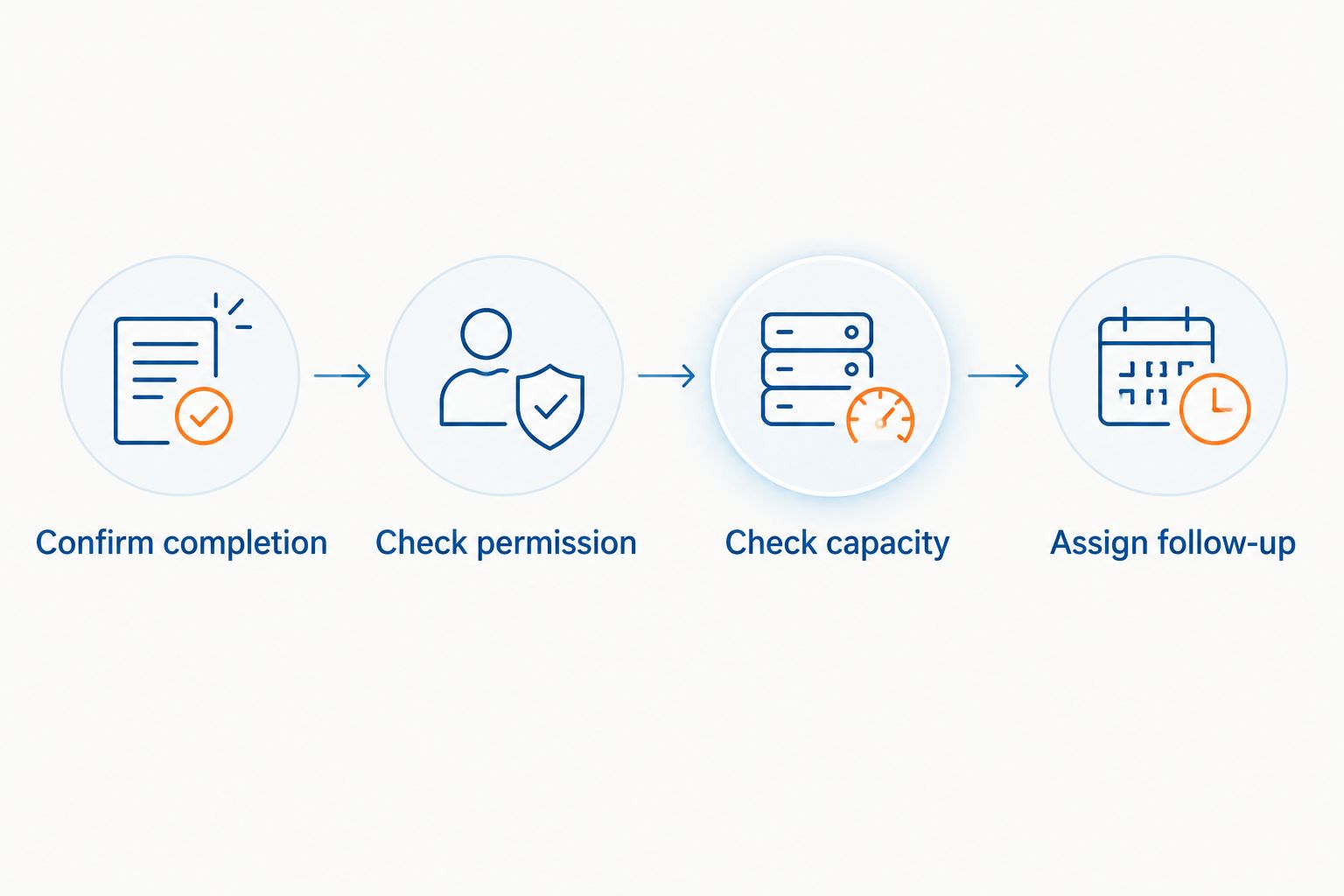
A completed job starts the check; it does not automatically authorise a marketing email.
Follow-up messages and team handover
Write messages around the customer’s next useful action. Do not force every service into the same repeat-purchase timetable.
- Draft a completion follow-up that helps the customer understand the work delivered and where to direct questions. Keep any necessary service message distinct from promotional content; adding an offer changes the consent considerations.
- Add a relevant retention message for eligible customers. Explain the reason for contact, identify your business and give a clear next step. Use the actual service history rather than a generic invitation to buy again.
- Route replies to Follow-up owner. Set an internal handling target, such as 1 business day, and confirm that the assigned person can meet it. This is a proposed operating standard, not an industry benchmark.
- Define exit conditions: unsubscribe, new booking, unresolved issue or a direct request to stop. Apply those conditions before each promotional message and cancel any queued messages that no longer fit.
Expected result: The customer receives a relevant message, and a responsible team member handles the response. The owner is an escalation point, not the default inbox.
For a hypothetical professional services firm, the next action might be arranging a review after an agreed milestone. For a home-services business, it might be a reminder tied to documented maintenance needs. Neither requires an invented universal waiting period.
Testing and reporting
Do not switch on the full list because a preview email looks right. Test the customer record, the decision rules and the handover together.
- Create clearly labelled test records for an eligible customer, an unsubscribed customer, an unresolved issue and an existing booking. Use addresses controlled by your business, not live customer addresses.
- Run each record through the workflow. Confirm that only the eligible record reaches the promotional send and that the other records stop for the correct reason.
- Reply to the test email. Check which inbox receives it, who gets the task and whether another staff member can cover an absence. Update a booking and confirm that remaining promotional follow-up stops.
- Record delivered emails, replies, booking requests, confirmed bookings and completed repeat jobs. Review the associated delivery costs before treating booked revenue as a profitable result.
Expected result: You can trace a message to a customer action and identify the person responsible for handling it.
Start your 2026 review with a 15-minute weekly check of exceptions and overdue replies. This is a suggested meeting length, not a performance claim. Use it to fix broken handovers rather than read campaign figures aloud.
Separate email-associated bookings from bookings proven to be caused by email. A customer who clicks and books provides a traceable connection; that alone does not prove the booking would never have happened otherwise.
Second variant: follow up when a service becomes due
A completed-job trigger suits post-service follow-up. A due-date trigger suits a genuine future service need. Choose the event that matches the customer relationship rather than putting everyone into both sequences.
| Workflow | Best for | Strength | Limitation |
|---|---|---|---|
| Completed-job follow-up | Services with a clear delivery endpoint | Connects the message to a recent interaction | Needs reliable completion and issue records |
| Service-due reminder | Services with a documented repeat requirement | Connects the message to a relevant future need | Wrong dates create irrelevant reminders |
Use service-due reminders only when the due date has a defensible basis. Do not invent a maintenance interval to justify another email.
- Populate Next service due from an agreed schedule or documented service requirement. Assign responsibility for checking that date.
- Trigger a reminder at a lead time that reflects booking availability and the customer’s planning needs. Recheck permission, unresolved issues and existing bookings.
- When the customer books, stop the reminder sequence. After delivery, update the record and calculate the next date only where appropriate.
Expected result: A relevant reminder reaches eligible customers without competing with an existing booking or an unresolved problem.
For your 2026 setup, keep the completion and due-date workflows visibly separate. Shared exclusion rules are useful; overlapping messages are not.
Troubleshooting
Customers receive the same message twice
Inspect the entry history and Workflow entry key. Repeated imports, completion-date edits or duplicate customer records can create repeated entries. Fix the trigger and merge records carefully, preserving consent evidence and unsubscribe status.
Promotional messages continue after booking
Check when Booking status updates and whether queued messages recheck it. Add the exclusion immediately before sending, not just at enrolment. Test cancellation of messages already waiting in the queue.
Replies disappear into the owner’s inbox
Check the reply destination, shared-inbox access and task assignment. Name a primary handler and a backup. Write down what they can resolve without approval and what genuinely requires escalation.
The workflow creates work the team cannot deliver
Pause booking invitations for the affected service and inspect the capacity check. A historical opening in the calendar is not current capacity. Give someone responsibility for updating availability before invitations resume.
Customers say the message is irrelevant
Inspect service history, due dates and duplicate records before rewriting the subject line. Incorrect segmentation produces incorrect messages. Remove customers from the unsuitable sequence and correct the underlying record.
Customise your workflow
Expand only after the basic handover works. Add service-specific messages, different reply owners or escalation rules where those differences change what the customer needs.
Use a 30-day pilot as a proposed observation period, not a promise of results. A longer service cycle needs a longer assessment window. Review record accuracy, response ownership and booking quality before widening the audience.
If booking requests keep returning to you, address the service-business lead handover before adding more messages.
Elevatory’s business coaching with done-with-you marketing implementation fits owners who want support connecting marketing, responsibilities and systems. The trade-off is participation: your team must supply accurate records, make decisions and carry the process. Do not choose coaching expecting a done-for-you replacement for operational ownership.
Build a team-owned retention process
Explore business coaching with done-with-you marketing implementation for your service business.
FAQ
What's the best email list to loyal customers workflow for a service business?
Start with completed-job follow-up that checks marketing consent, unresolved issues and existing bookings before sending. Assign replies to a named team member and connect booking invitations to delivery capacity.
Can I send marketing emails to everyone who has booked before?
A past booking alone is not a complete marketing-consent record. Check the basis for consent, retain supporting records and honour unsubscribe requests before including customers in promotional follow-up.
How long should I wait before sending a repeat-service reminder?
Use the actual service requirement and the customer's booking needs, not a universal delay. If there is no documented reason for another service, do not invent a due date.
Do I need new email marketing software to build this?
Not necessarily; first check whether your existing systems can apply eligibility rules, stop queued messages and assign replies. If they cannot, define those requirements before choosing another system.
How do I measure whether retention emails are working?
Track delivered emails through replies, confirmed bookings and completed repeat jobs, then inspect delivery costs. Report traceable email-associated bookings without assuming every booking was caused by the email.
Who should own customer retention emails in a small business?
Give a named team member responsibility for the workflow and assign clear duties for records, replies and delivery updates. Keep the owner responsible for defined escalations rather than every routine decision.
Can Elevatory help with the process as well as the marketing?
Elevatory provides business coaching and done-with-you marketing implementation, including funnels, paid advertising, offers and systems strategy. That is a different engagement from hiring a done-for-you operator to take over customer administration.
One last thing
Your most useful retention action can be a blocked email. Stopping an invitation because a customer has an unresolved problem protects the handover from making that problem worse.
Before expanding your 2026 workflow, ask a team member to explain why a test customer received—or did not receive—a message. If the answer requires you, the system still depends on the owner.
Related guides
Book a free growth strategy call
Forty-five minutes with a strategist to pressure-test where your business is stuck and what to prioritise next.
Prefer to talk first? Call 1300 634 230 or email chris@elevatory.com.au