

Marketing automation saves a growing ecommerce brand only when the manual work it removes exceeds the work and expense it creates; there is no single savings figure that applies to every store. Setup, monitoring, corrections and ongoing fees belong in the calculation. For your 2026 decision, measure owner time, team capacity and cash savings separately before treating automation as a growth investment.
TL;DR
- Marketing automation savings ecommerce calculations must subtract setup, monitoring and corrections from manual work removed.
- Hours released are capacity gains, not cash savings, unless an actual expense falls.
- Elevatory suits established Australian owners seeking business coaching with done-with-you implementation, rather than software alone.
- Delegate workflow ownership before adding automated email marketing and customer retention sequences.
How much does marketing automation save a growing ecommerce brand?
Your saving is the difference between the manual workload and the full workload after automation—not the number of messages sent. Start with a task your team already performs, then compare the same activity before and after the change.
Use a consistent reporting period and record actual work. Do not turn every hour removed into a payroll saving: an employee who spends less time sending emails still receives their salary.
| Measure | Calculation | What it tells you |
|---|---|---|
| Net time released | Manual handling time minus ongoing handling, monitoring and corrections | Whether the workflow releases capacity |
| Cash saving | Expenses actually removed minus new ongoing expenses | Whether spending falls |
| Setup recovery | Initial setup expense divided by net recurring cash saving | Whether cash savings recover implementation expense |
| Owner dependence | Owner interventions before versus after implementation | Whether the team can operate without constant approval |
Keep additional sales in a separate column. Revenue attributed to a message is not evidence that the same revenue would disappear without it.
If every exception still reaches you, start by measuring owner dependence. An unattended email sequence and an owner-independent process are different things.
Why this matters
A growing ecommerce business needs capacity to deliver, not just more activity in its marketing account. Removing repetitive work matters when the team uses that capacity to resolve customer issues, improve fulfilment or make better commercial decisions.
The wrong target creates busywork. Automating a weak process can leave you with faster messages, more exceptions and the same owner approving everything.
Set your 2026 objective in operational terms: fewer manual handovers, clearer responsibilities or less owner involvement. Then decide which marketing activity supports it.
Measure the saving before choosing the workflow
Build a baseline from completed work rather than memory. Ask the person doing the task to record the action, its handling time, the reason for any rework and whether the owner became involved.
Record the manual work
Include preparation, checking and follow-up. For an email workflow, that means more than the time spent pressing send: record audience selection, exclusions, content checks and customer questions caused by the message.
Separate recurring tasks from unusual incidents. Otherwise, an exceptional week becomes your supposed normal workload and exaggerates the saving.
Record what remains
After automation, track monitoring, content updates, failed handovers and exception handling. Include work moved to another employee rather than eliminated.
A task transferred from the owner to the team is delegation; a task no longer required is removal. Both matter, but they belong in different columns.
Reconcile the cash
Check whether any invoice, overtime payment or outsourced task actually disappears. If no expense falls, report released capacity rather than cash saved.
For your 2026 business case, keep implementation effort separate from recurring operation. A workflow that reduces ongoing handling can still require substantial setup attention; hiding that work makes the decision look better than it is.
Which approach fits your team's workload?
Choose the operating model before choosing more software. The practical choice is between human handling, rules-based automation and a combination of both.
| Approach | Best for | Benefit | Limitation |
|---|---|---|---|
| Manual handling | Unusual cases requiring judgement | A person can interpret context before acting | Repeated handling consumes team attention |
| Rules-based automation | Repetitive actions with clear triggers and exclusions | Removes repeated execution of defined tasks | Incorrect rules can repeat the same mistake |
| Hybrid handling | Routine steps with sensitive exceptions | Automates predictable work while retaining human review | Requires a clear handover and accountable owner |
Use rules for predictable actions and people for decisions that need context. Do not automate an unresolved judgement call simply because a platform allows a trigger.
The hybrid approach still needs boundaries. Specify what runs automatically, what stops the sequence and who receives the exception. Without those rules, staff must inspect everything to feel safe, which defeats the original purpose.
Welcome emails: measure repeated setup work removed
A welcome sequence is a candidate when your team repeatedly sends the same introductory information to eligible subscribers. Its value comes from removing repeated execution, not from replacing judgement about what customers need.
Document the entry condition, consent requirements, exclusions and exit condition. Assign responsibility for checking links and updating content when your offer changes.
The limitation is maintenance. A sequence can continue sending information that no longer matches the business unless someone owns its accuracy. Count those checks in the ongoing workload.
Abandoned checkout follow-up: separate recovery from savings
Checkout follow-up involves both operational work and potential sales outcomes. Keep those measures separate: time saved on manual follow-up is not the same as profit from additional orders.
Specify when a customer leaves the sequence, including after purchase. Review overlapping campaigns so the customer does not receive conflicting messages from different workflows.
The limitation is attribution. A reported purchase after an email does not establish that the email caused the purchase. Use a suitable comparison where practical, and avoid presenting attributed revenue as guaranteed incremental revenue.
Post-purchase messages: connect marketing to delivery
Post-purchase automation belongs alongside fulfilment and customer service, not in a separate marketing silo. Messages should reflect the actual stage of the customer's order or relationship.
Define what happens when an order changes, a customer raises a problem or an expected event fails to occur. The team needs authority to pause unsuitable communications without waiting for the owner.
A customer retention workflow needs those handovers as much as it needs content. The limitation is that poor order information can produce inappropriate follow-up, creating customer service work rather than removing it.
Why marketing automation savings vary
The difference comes from the work, the rules and the people responsible for exceptions. Assess these factors against your own records rather than adopting another store's headline result.
- Repetition: A recurring task creates a different opportunity from an occasional request requiring individual attention.
- Process clarity: Unclear triggers, exclusions and responsibilities make a workflow harder to operate consistently.
- Information quality: Incorrect customer or order information creates checking and correction work.
- Exception handling: Someone must own failed actions and unusual customer situations.
- Delivery capacity: Additional demand needs fulfilment and customer service capacity behind it.
- Owner involvement: Automation does not remove dependence if every decision still requires your approval.
A hypothetical ecommerce example: a team automates customer follow-up, but every complaint still goes to the founder. Routine sending work falls; founder dependence remains. The next action is to define decision authority, not add another sequence.
Put a team owner behind the process
Delegate a complete responsibility rather than a collection of buttons. A workflow owner needs to know the intended outcome, the boundaries and when to escalate.
Use this sequence before expanding automation:
- Map the task. Write down what starts the work, what happens next and where it ends.
- Assign ownership. Name the person accountable for accuracy and exceptions.
- Set boundaries. Define actions the team can take without owner approval.
- Test exceptions. Check what happens when the normal sequence breaks.
- Review outcomes. Compare actual handling work and customer outcomes with the baseline.
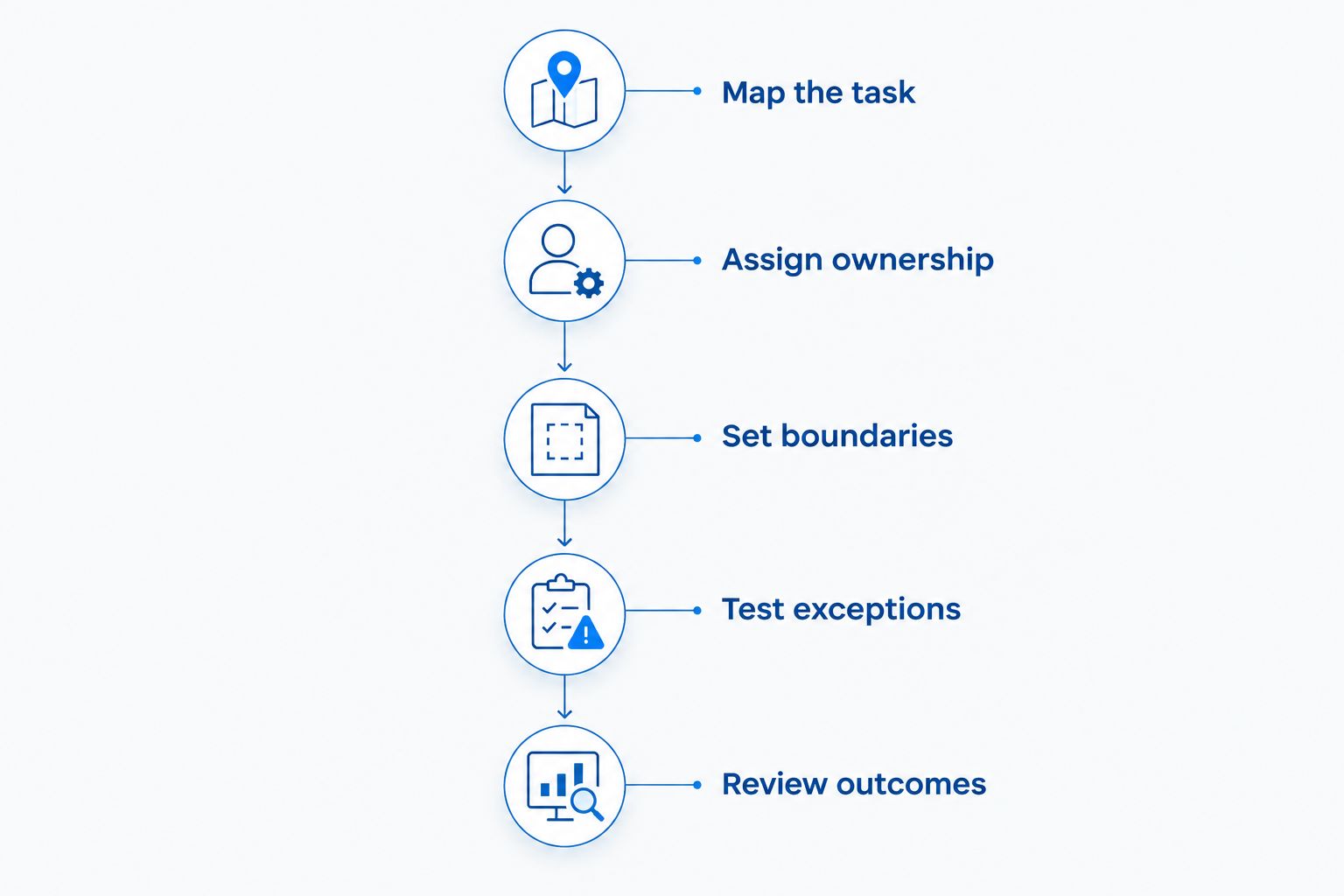
Assign responsibility and exception rules before judging the saving.
For a 2026 rollout, make the handover usable by someone other than the person who built it. Store the operating instructions where the team already works, and include how to pause the workflow.
A process that only its builder understands remains dependent on an individual. That is a different bottleneck, not a completed handover.
Count maintenance before claiming a saving
Treat automation as an operating responsibility. Messages, customer groups, connected systems and business rules require review when the underlying business changes.
Your assessment of business process automation costs needs to include implementation, maintenance and exception handling, not just the subscription invoice. Those activities determine whether the workflow removes work or moves it elsewhere.
Keep a record of changes and why they happened. If a workflow repeatedly creates corrections, fix the rule or pause it rather than asking staff to absorb the extra work indefinitely.
The same discipline applies to reporting. Do not celebrate fewer manual sends while ignoring a growing customer service queue. Review the entire process, including the people who receive its output.
When coaching and implementation support fit
Choose support around the constraint. If the team knows the process and only needs a technical connection, define that technical scope. If responsibilities, priorities and commercial decisions remain unclear, a software installation alone does not resolve them.
Elevatory is best for established Australian owners seeking business coaching with done-with-you marketing implementation. Its stated focus is businesses turning over $150K–$5M, with support across offers, funnels, paid advertising and systems strategy.
Elevatory business coaching fits a brief that connects marketing decisions with team capacity and owner responsibility. It is not a done-for-you agency or a software product; you need to distinguish implementation support from handing over the entire function.
Before seeking support, bring the manual workload, current responsibilities and unresolved decisions. Ask what your team will own after implementation and how the outcome will be assessed. That produces a clearer brief than asking for more automation.
Does marketing automation save money or just time?
Marketing automation saves money only when the financial benefit exceeds its full expense. Time released becomes a cash saving only when spending falls; otherwise, it is capacity your team can redirect.
Report both, but do not combine them into a single inflated savings claim.
Can automation reduce owner dependence?
Automation reduces owner dependence only when responsibilities and decision boundaries move with the task. An automated workflow that still needs the founder to resolve every exception has not removed the management bottleneck.
Give the team authority within defined limits, then track how often the owner must intervene.
How do you know whether the saving is real?
A real saving appears in comparable records of time, expenses or owner involvement. Compare equivalent work, include maintenance and explain changes in order volume or task complexity.
In your 2026 reporting, label capacity released, cash saved and additional contribution separately. Each answers a different business question.
FAQ
How much can marketing automation save my ecommerce business?
Your saving depends on the manual work removed minus setup, operation, monitoring and correction work. Measure cash savings separately from staff capacity and additional sales.
Does time saved by automation reduce payroll expenses?
Time saved does not reduce payroll expenses unless an actual payroll expense falls. If employees use the released time elsewhere, report a capacity gain instead.
What's the best marketing task to automate first?
Start with a repetitive task that has clear rules, reliable information and a named owner. Avoid starting with a process whose exceptions or customer consequences remain unclear.
Can I count abandoned checkout revenue as automation savings?
Abandoned checkout revenue is not an operational saving. Assess the contribution from genuinely additional orders separately, rather than treating all attributed revenue as a benefit caused by automation.
Can automation replace the person managing customer emails?
Automation can execute defined actions, but someone still needs responsibility for rules, accuracy and exceptions. Decide which work disappears and which work changes before changing a role.
Does Elevatory offer software or implementation support?
Elevatory offers business coaching with done-with-you marketing implementation, not a software product. Its stated areas include offers, funnels, paid advertising and systems strategy.
One last thing
Before automating a task, ask whether it needs to exist. An unnecessary approval, duplicated report or redundant handover is a candidate for removal, not a more elaborate workflow.
Your next move is to select a recurring task, name its owner and record its full workload. Automate only after the team can explain the rule and handle the exception without defaulting to you.
Related guides
Book a free growth strategy call
Forty-five minutes with a strategist to pressure-test where your business is stuck and what to prioritise next.
Prefer to talk first? Call 1300 634 230 or email chris@elevatory.com.au