

Automation can replace a virtual assistant for repeatable small business admin, but not for work that needs judgement, negotiation or responsibility for exceptions. For an established Australian service business, the practical choice is to automate clear rules and give a person authority over everything those rules cannot resolve.
TL;DR
- Can automation replace a virtual assistant? Yes for repeatable admin; keep a person responsible for exceptions.
- Use automation for defined triggers and actions, not unresolved customer requests or delivery decisions.
- Elevatory combines business coaching with done-with-you implementation for established Australian businesses needing systems and marketing support.
- Small business coaching should connect delegation and marketing activity to the team's delivery capacity.
Why this matters
Replacing admin tasks is not the same as reducing owner dependence. If every unusual enquiry, booking change and invoice dispute still reaches you, the business has changed its tools without changing who makes decisions.
Start by defining what your team can own without you. Your 2026 admin plan needs clear responsibilities before it needs more connections between apps. Otherwise, you become the person supervising both the assistant and the automation.
The goal is fewer routine decisions on your desk, not simply fewer manual clicks. Keep customer commitments, team capacity and service quality inside the decision.
Can automation replace a virtual assistant for small business admin?
Yes, for a defined set of tasks. No, for an entire role that includes judgement, customer conversations and follow-through across changing circumstances.
A virtual assistant role can contain both kinds of work. Separate the tasks before deciding whether to replace the role, narrow it or redesign it.
| Approach | Best for | Main advantage | Main limitation |
|---|---|---|---|
| Automation | Repeated tasks with clear inputs and rules | Executes a defined action after a trigger | Needs explicit handling for missing information and exceptions |
| Virtual assistant | Admin requiring context, clarification and coordination | Can ask questions and work through unusual requests | Needs training, access boundaries and clear authority |
| Combined approach | Routine admin mixed with customer exceptions | Separates standard processing from human decisions | Needs a named person to monitor failures and handovers |
A booking confirmation is a task. Managing a diary is a responsibility. Software can send the confirmation, but someone must decide what happens when a customer requests an appointment that clashes with the team's actual capacity.
Automate the task only when you can describe the rule and the exception route. If you cannot explain both, document the process before trying to remove the person.
Automation: best for clear, repeatable rules
Choose automation when the input is consistent, the action is explicit and a failure is visible. Examples include transferring submitted enquiry details into a customer record or sending an acknowledgement after a form submission, where your systems support those actions.
Define the trigger precisely. A submitted form is different from a qualified enquiry, and a requested appointment is different from a confirmed booking. Treating those events as interchangeable creates promises your team has not approved.
For your 2026 workflow review, write down what must be true before an action runs. Include the required information, the destination and the person alerted when processing stops.
The advantage is repeatable execution. The limitation is that a correctly executed rule can still produce the wrong business outcome when the rule itself is incomplete.
A virtual assistant: best for context and coordination
Keep a person involved when the task requires clarification, prioritisation or a conversation. An assistant can ask what a customer means, identify missing details and work within an agreed escalation process.
That does not mean giving an assistant unlimited discretion. Set boundaries around refunds, discounts, complaints, sensitive information and commitments about delivery. A remote assistant should not promise a job date without the authority and information to make that decision.
The advantage is human judgement within a defined role. The limitation is that judgement still depends on training, access and a clear understanding of your service.
If instructions amount to asking you whenever anything changes, you have delegated activity but retained responsibility for every exception. Fix the authority gap rather than blaming the assistant.
A combined approach: best for routine work with exceptions
Use automation for the predictable path and an assistant for the cases that leave it. Give the assistant a visible queue, a definition of completion and an escalation boundary.
For example, a system can acknowledge a new enquiry while an assistant checks whether the requested work fits your service area and booking rules. That division works only if the acknowledgement does not imply acceptance of the job.
The advantage is a clear separation between processing and decision-making. The limitation is maintenance: someone must update the rules when your offers, service areas or team responsibilities change.
A combined approach still needs an owner. Shared access to a dashboard is not the same as responsibility for resolving what appears there.
Why the right choice varies
Choose the approach around the work, not around a general preference for software or people.
- Input consistency: Structured forms are easier to process predictably than messages with missing or contradictory details.
- Judgement required: Applying an agreed rule differs from deciding whether to make an exception.
- Consequence of error: An incorrect internal label differs from an incorrect customer commitment.
- System connections: Confirm that your actual systems support the required trigger, action and failure notification.
- Delivery capacity: Enquiry handling must reflect who can deliver the work and when.
- Ownership: Someone must monitor unresolved items, maintain instructions and approve changes.
Business turnover alone does not answer the question. A smaller business with a stable process can have a clearer automation candidate than a larger business whose booking rules live in the owner's head.
How do you decide what to automate first?
Use this sequence to assess an existing admin process. These are planning instructions, not promised time savings.
Define the outcome
Write what completion means in plain English. For an enquiry, that might mean the details are recorded, the customer receives an acknowledgement and the next action has an owner.
Avoid vague outcomes such as handling leads. They conceal several decisions inside a single instruction and make it difficult to tell whether the process has finished.
Separate decisions
Mark which actions follow a rule and which require judgement. Copying a supplied phone number is different from deciding whether an incomplete enquiry deserves an urgent callback.
Keep decisions about suitability, scope and commitments explicit. Do not let them disappear into a generic status such as processed.
Set authority
Name who can act, who can approve an exception and who takes over when the usual person is unavailable. State what the assistant can decide without asking you.
Give the process a backup as well as a primary owner. An exception queue that nobody checks during leave is not a completed handover.
Test exceptions
Test the normal path and the failure paths before relying on the workflow. Use dummy records rather than exposing real customer information unnecessarily.
For a 2026 pilot, test 3 scenarios: a complete enquiry, an enquiry missing required details and a duplicate enquiry. These are starting tests, not a complete test suite. Add cases specific to your work.
Review ownership
Check who now handles routine work and who resolves exceptions. If both routes still end with you, revise responsibilities before expanding the workflow.
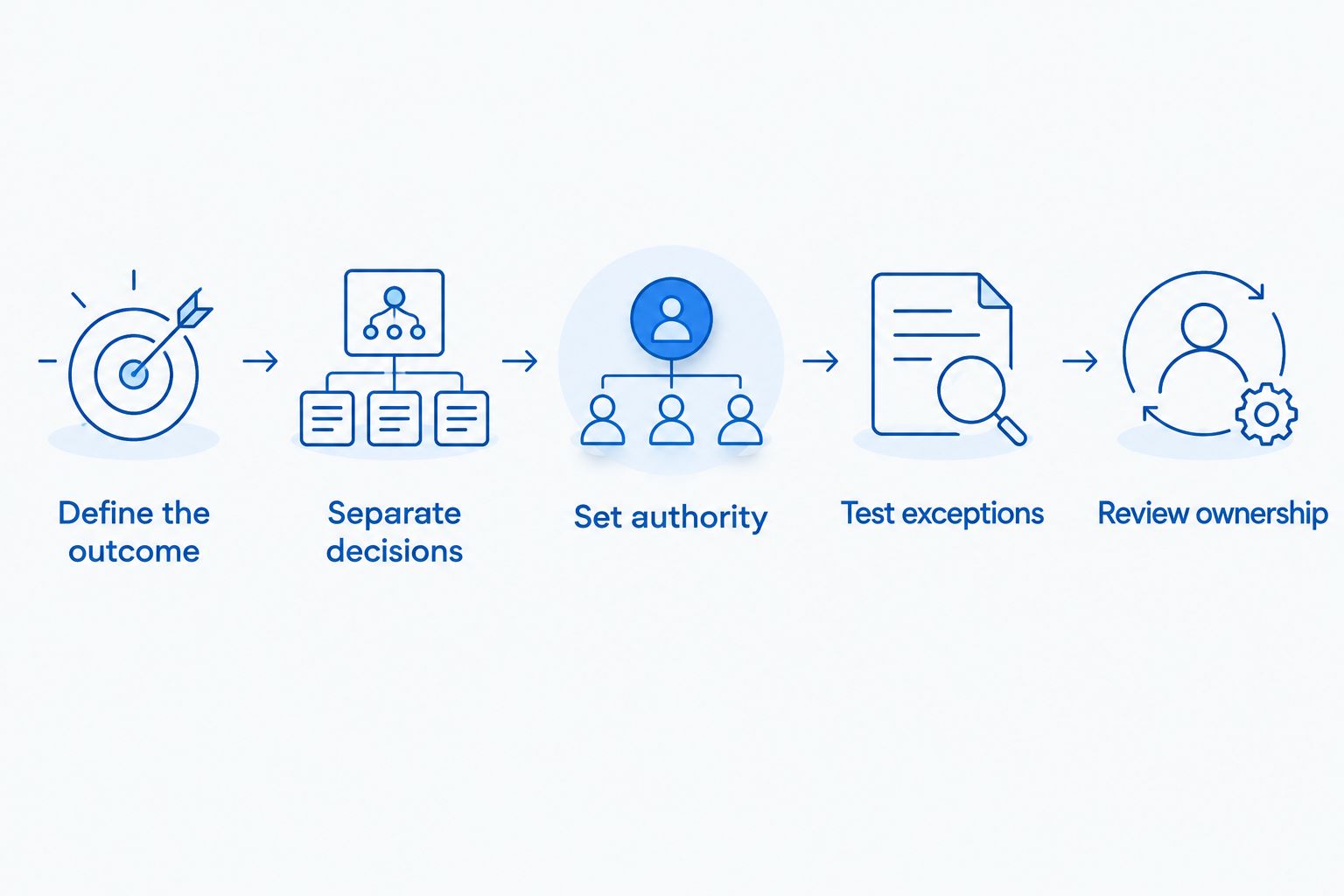
Define responsibility before expanding automation.
The sequence matters because connecting systems cannot settle an unresolved business decision. Finish the process design first; then configure the supported actions.
How do you run a pilot without creating more owner work?
Start with 1 workflow, not the entire admin role. Record its trigger, required information, completion condition and escalation route on a single process sheet.
When choosing which tasks to automate, prioritise a process whose rules are already clear. The discipline behind choosing which tasks to automate is separating a repeatable task from a broken handover; otherwise, the automation reproduces the confusion.
Set an initial review after 7 working days. That is a suggested checkpoint, not an evidence-based implementation timeline. Review sooner if the workflow makes customer commitments or produces errors.
At that review, inspect the actual records. Check whether enquiries reached the right person, acknowledgements said the right thing and exceptions received a decision. Ask the assistant where manual repair was required.
Keep a manual fallback until the process has demonstrated that it works under your operating conditions. Define when to pause it and who can make that call. A pilot should expose weaknesses before you extend the same rules across the business.
What should stay under human control?
Keep a person accountable for decisions that alter scope, customer expectations or delivery commitments. Automation can support the paperwork around those decisions without making the decisions itself.
Hypothetical trade-business example: A customer submits a request for electrical work. An automated acknowledgement confirms receipt, while an assistant checks the information against the business's service rules. The person authorised to schedule work confirms the booking against crew capacity.
The automation has removed an administrative step. It has not established whether the job is suitable or whether the team can attend.
Hypothetical professional-services example: A prospect requests work outside a firm's usual scope. An assistant gathers the missing details and sends the request to the authorised decision-maker. An automatic acceptance would bypass that review.
Neither example is a client result. Both show the same boundary: use software to move information, and assign responsibility for commitments to someone with authority.
How should admin automation connect to marketing?
Your 2026 marketing plan should not treat every enquiry as a booking waiting to happen. Define which enquiries fit your offer, who qualifies them and how the team confirms delivery capacity.
An acknowledgement can confirm receipt. It should not imply that a booking, quote or scope has been approved unless the process genuinely includes that approval.
Review 3 measures together: owner interruptions per week, unresolved enquiries at review and confirmed bookings the team cannot fulfil as promised. These are suggested operating measures, not industry benchmarks. They help you distinguish reduced admin from work merely shifted into rework.
More enquiries are not the answer when the team cannot allocate or deliver the work. Fix the handover before increasing demand.
When does coaching help more than another automation?
Coaching fits when the unresolved issue is responsibility, priorities or the connection between marketing and delivery. Technical configuration fits when those decisions are settled and the remaining task is building the workflow.
Elevatory business coaching is best suited to established Australian businesses seeking coaching with done-with-you marketing implementation. The focus includes offers, funnels, paid advertising and systems strategy, rather than supplying software or replacing your admin team.
The distinction matters. Elevatory is not a substitute for a person responsible for daily administration. Choose this kind of support when you need help deciding what the team should own and how marketing should connect to delivery; choose an assistant when the immediate need is carrying out a defined admin role.
FAQ
Can automation replace a virtual assistant completely?
Automation can replace defined tasks, but not every responsibility within a virtual assistant role. Keep a person accountable for exceptions, customer commitments and decisions that require context.
What's the best admin task to automate first?
The best first task has consistent inputs, an explicit rule and a visible failure path. Start with an existing process you can explain clearly rather than using automation to conceal an unresolved handover.
Is a virtual assistant better than automation for customer enquiries?
A virtual assistant is better suited to enquiries requiring clarification, judgement or coordination. Automation fits acknowledgement and information transfer when the rules and system connections support them.
Should I remove my assistant's access once a task is automated?
Set access around the assistant's remaining responsibilities rather than removing it automatically. If the assistant handles exceptions, provide the information and permissions needed to resolve them without unnecessary access.
How do I know whether automation has reduced owner dependence?
Check whether routine decisions and exceptions now reach an authorised team member instead of you. Faster processing alone does not prove that the business relies less on its owner.
Can Elevatory help me choose between delegation and automation?
Elevatory provides business coaching with done-with-you marketing implementation and systems strategy. That support suits established Australian businesses working through priorities, team responsibilities and the connection between marketing and delivery.
One last thing
Add a stop rule to every workflow in your 2026 admin plan. State who pauses it, what triggers the pause and how the team handles the work manually.
A process is not ready to run without you until someone else knows when to stop it. That is a clearer handover test than whether the automation ran successfully once.
Related guides
Book a free growth strategy call
Forty-five minutes with a strategist to pressure-test where your business is stuck and what to prioritise next.
Prefer to talk first? Call 1300 634 230 or email chris@elevatory.com.au