

Instead of manually forwarding Facebook enquiries and approving every sales call, connect your lead form to a named team member, a qualification rule and a booking calendar. This 2026 workflow turns Facebook lead ads to booked calls into a team-owned process, with the owner handling exceptions rather than every enquiry.
TL;DR
- Facebook lead ads to booked calls needs qualification, calendar capacity and a named owner—not just an automated booking link.
- Use Zapier to capture enquiries, HubSpot to record ownership and Acuity Scheduling to manage appointments.
- Elevatory business coaching suits established Australian service businesses that want done-with-you implementation, not outsourced ownership.
- Measure qualified appointments, attendance and profitable work—not form submissions alone.
Why this matters
A booking automation does not fix unclear responsibilities. If every enquiry still needs the owner's judgement, the software just moves the queue.
Elevatory business coaching is best for established Australian service business owners who want coaching with done-with-you marketing implementation. That includes deciding who qualifies leads, who takes calls and when advertising needs to slow down because delivery is full.
Start with the service-business lead handover if enquiries currently sit across inboxes and phones. Then build the automation around the person responsible for the next action.
For your 2026 reporting, separate a submitted form, a qualified enquiry, a booked appointment and an attended call. They are different stages. A booking is not a sale, and a sale is not proof of profitable delivery.
Before you start
- Accounts and access: Have access to the Facebook Page, ad account, selected instant form, Zapier, HubSpot and Acuity Scheduling. The person connecting Facebook must have permission to retrieve leads; advertising access alone does not establish that.
- Team and materials: Nominate a lead coordinator and call-taker. Prepare your service-area rules, qualification questions, booking calendar, privacy information and follow-up wording. Confirm that your accounts support the required connections before building.
- The gotcha: Treat the Facebook form ID as part of the configuration. A replacement form needs its connection checked and tested. Also, do not assume historical leads will enter a new automation; reconcile existing enquiries separately.
The tools and their trade-offs
This guide uses a specific stack so the setup has a clear shape. It does not require you to replace working systems with these products.
| Tool | Best for | Role in this workflow | Advantage | Limitation |
|---|---|---|---|---|
| Facebook Lead Ads | Capturing enquiries inside Facebook | Collect contact details and qualifying answers | Keeps the initial enquiry inside the platform | A submitted form does not establish suitability or intent |
| Zapier | Connecting separate systems | Pass lead and appointment events between accounts | Separates the handover from manual copying | Permissions, field mapping and failed runs need oversight |
| HubSpot | Keeping a shared enquiry record | Store contact details, qualification and ownership | Gives the team a common contact history | Contact records alone do not enforce follow-through |
| Acuity Scheduling | Offering controlled appointment times | Manage the calendar and appointment details | Lets prospects select from permitted times | A scheduled appointment still needs matching and attendance tracking |
Keep the architecture simple. Use one system as the source of truth for lead status rather than allowing each tool to maintain a conflicting version.
Lead ownership and qualification rules
Set the operating rules before connecting accounts. Otherwise, your automation will distribute uncertainty faster.
- Name the lead coordinator and backup. Give the coordinator authority to accept, decline or request missing information within written boundaries.
- Define qualification using service type, service area, job suitability and delivery capacity. Ask only for information that changes the next action.
- Create your own CRM fields labelled Lead owner, Qualification status, Booking status and Next action. These are proposed field names for your configuration, not default HubSpot labels.
- Define when the coordinator must escalate. Examples include work outside your service scope or a prospect requesting terms the team cannot approve.
- Set a follow-up deadline. As a starting operating rule, assign unanswered enquiries a task due within 1 business day; adjust that rule to your staffed hours and actual response capacity.
Expected result: Someone other than the business owner can explain what happens to an enquiry and make the routine decision without asking permission.
A hypothetical plumbing business might send planned renovation enquiries to a quoting coordinator while routing urgent repair enquiries to a separate response process. The point is different handling—not a claim that either category produces better results.
Facebook lead capture configuration
Build the capture connection first. Do not add a chain of messages until the contact data lands correctly.
- In Zapier, add a trigger and select Facebook Lead Ads as the app. Choose New Lead as the trigger event.
- Connect the authorised Facebook account. In Page and Form, select the exact Page and instant form used by the campaign.
- Select Test trigger and inspect the sample. Check the email address, phone number, qualifying answers and source identifiers supplied by the form.
- Add a HubSpot action. Select Create or Update Contact, connect the account and map the email address to Email. Map names to First Name and Last Name when those values are supplied separately.
- Map relevant qualifying answers into your corresponding CRM properties. Preserve available lead, form and campaign identifiers so the team can trace the enquiry back to its source.
- Test the action and inspect the resulting contact in HubSpot. Confirm that values appear in the intended fields rather than merely checking that the automation reports success.
Expected result: A test lead creates or updates the intended contact, with usable contact details and the information your coordinator needs.
Email-based matching has a limit: two different email addresses can represent the same person. Establish a manual merge rule for confirmed duplicates instead of merging people solely because their names match.
For your 2026 build, record which form feeds which automation. Include the responsible person and the date of the last successful end-to-end test.
Qualification and booking invitation
Choose how an enquiry earns a booking invitation. Do not send every form submission directly into the owner's diary.
| Route | Best for | Benefit | Trade-off |
|---|---|---|---|
| Coordinator review | Complex jobs or enquiries needing context | A person checks suitability before offering a call | Requires a staffed queue and clear response ownership |
| Rule-based invitation | Services with clear, objective eligibility | Suitable enquiries can progress without manual approval | Weak questions or missing answers can route enquiries incorrectly |
- Start with coordinator review if suitability depends on judgement. Assign the contact, create the next-action task and have the coordinator record the qualification decision.
- For rule-based routing, require explicit qualifying values before the invitation action. Send blank, contradictory or unmatched answers to review rather than treating them as approval.
- Configure the Acuity appointment type and connected calendar. As an illustrative starting configuration, use a 15-minute qualification call with a 10-minute buffer; change both to match the work your team actually does.
- Set the calendar's Time Zone and check the time displayed to a test booker. Queensland does not observe daylight saving; interstate callers need an unambiguous appointment time.
- Write an invitation that states the call's purpose, who will attend and what information to bring. Send it through your authorised communication system, consistent with the permissions collected.
- Give the coordinator a follow-up task when a qualified enquiry has not booked. Stop that task sequence when the appointment is recorded.
Expected result: Qualified prospects receive a relevant invitation, unsuitable enquiries do not consume sales-call time, and unanswered invitations remain someone's responsibility.
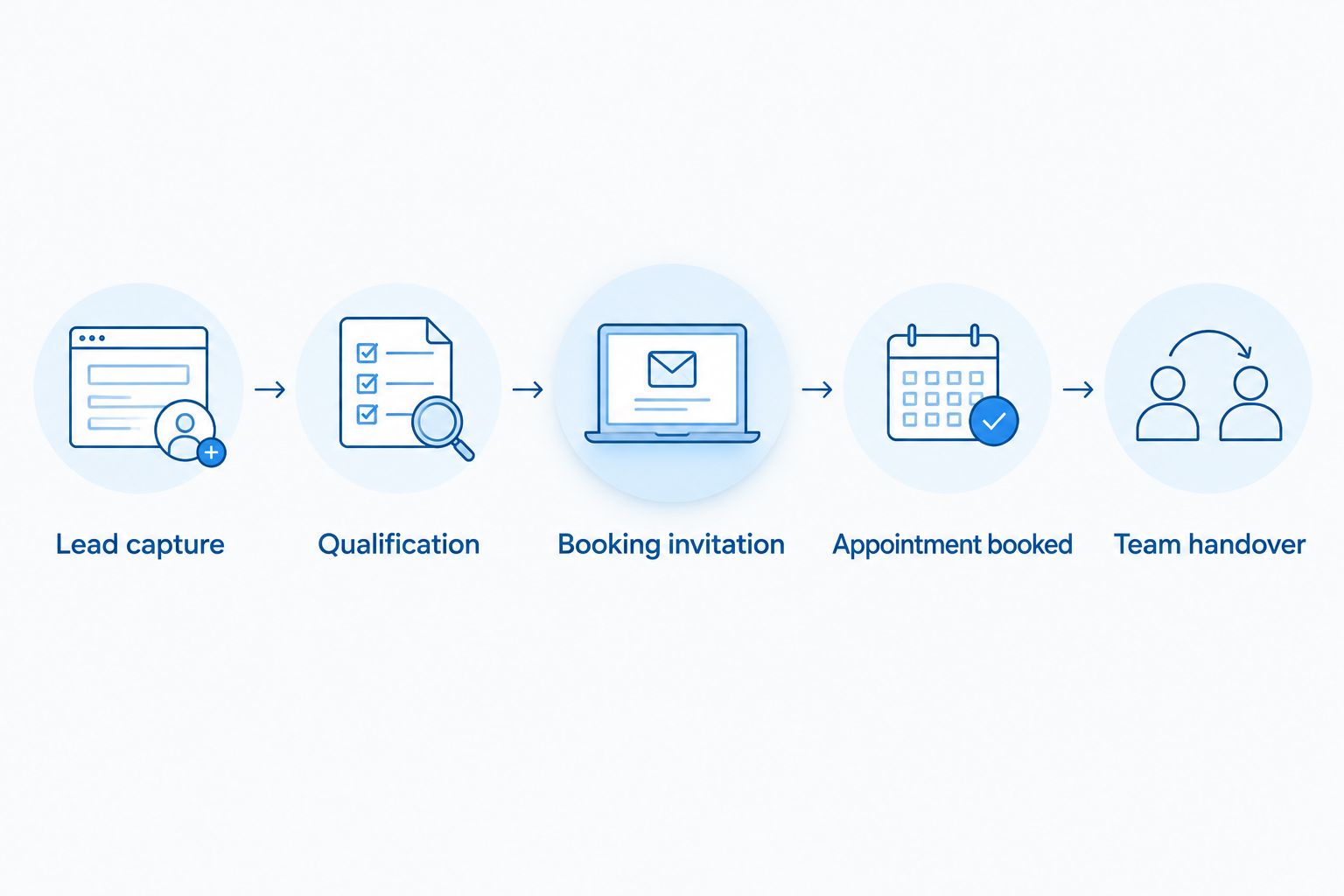
Qualification sits before the booking invitation, not after the calendar fills.
Use the diagram as your handover check. The team should know which person owns each stage and which event moves the enquiry forward.
Appointment confirmation and team handover
An invitation sent is not an appointment booked. Build a separate connection from the scheduling system back to the contact record.
- Create a second Zap using Acuity Scheduling and the New Appointment trigger. Connect the scheduling account and test with an appointment you control.
- Match the appointment to the CRM contact using the booking email address. Route unmatched appointments to review rather than attaching them to the nearest-looking name.
- Write the appointment time, appointment identifier and assigned call-taker into the relevant CRM fields. Change your Booking status to the value you have defined for a confirmed booking.
- Stop pending invitation follow-ups. Notify the call-taker with the enquiry's service requirements, qualifying answers and any missing information.
- Test the full journey from a Facebook test lead to a scheduled appointment. Confirm that the contact record, diary entry and team notification agree.
Expected result: The appointment appears against the right contact, the call-taker has context and the prospect no longer receives requests to book the call already scheduled.
When you track booked calls in Meta, use the confirmed appointment event rather than a booking-page visit. A page visit shows interest; it does not establish that someone selected and confirmed a time.
Treat Meta conversion reporting as a separate configuration from CRM status updates. Confirm the event mapping, consent requirements and duplicate-event controls before using that reporting to judge campaigns.
For 2026 reporting, retain the appointment identifier when sending the same booking through connected systems. It gives your team a concrete record to investigate when counts disagree.
Update the workflow when appointments change
The adjacent workflow is appointment maintenance. A rescheduled or cancelled call must not remain recorded as an active appointment at its original time.
Use the scheduling connector's supported change events, or its supported webhook mechanism, to update the existing booking record. Match on the appointment identifier wherever the payload provides it. Test the actual behaviour rather than assuming every change arrives as a new booking.
For a reschedule, replace the stored time and notify the call-taker. For a cancellation, stop reminders and return the enquiry to an appropriate next-action queue. Record attendance separately after the call; the passage of the appointment time does not prove attendance.
Do not count a reschedule as another acquired prospect. Keep enquiry counts, appointment counts and attended-call counts distinct.
This second workflow is also where team responsibility matters. The coordinator should own unmatched updates and failed changes, rather than leaving the business owner to discover diary errors.
Troubleshooting
The trigger cannot find the form or retrieve leads
Check that the connected Facebook account has access to the correct Page and leads. Reconnect after permission changes, select the intended form again and run a fresh test. Confirm the campaign uses that form rather than a similarly named replacement.
Contact details arrive but qualifying answers are blank
Compare the trigger sample with the current form. Questions added or replaced after the original setup need their mappings checked. Test a submission containing those answers before allowing rule-based invitations to resume.
One person appears as multiple contacts
Inspect the email addresses used on the lead form and booking. Different addresses can defeat email-based matching. Keep unmatched appointments in review and merge only after the team confirms identity; name-only matching risks combining unrelated people.
Booked prospects still receive booking invitations
Check that the appointment workflow updates the same contact that the invitation workflow reads. Then inspect pending tasks and messages. Add a booking-status check immediately before each follow-up action, not only when the sequence starts.
Calendar slots exceed the team's capacity
Check calendar connections, blocked time, buffers and appointment limits. Then inspect delivery capacity separately: an empty sales calendar does not mean the team can fulfil more work. Reduce invitations or advertising when the delivery constraint requires it.
Customise your workflow
Once the basic handover works, improve the decision rules before adding more automation. Extend your 2026 process to record attended calls, quotes issued, work won and delivery handovers.
Review these measures together:
- Qualification rate: Qualified enquiries divided by total enquiries.
- Booking rate: Booked qualified enquiries divided by qualified enquiries.
- Attendance rate: Attended appointments divided by booked appointments, with cancellations handled consistently.
- Sales outcome: Work won from the attended-call group, alongside the margin and capacity needed to deliver it.
Use the same reporting period and definitions each time. Separate recent enquiries still awaiting a decision from completed outcomes.
Elevatory's done-with-you implementation fits the point where the connection works but ownership, qualification or delivery constraints remain unresolved. Bring the enquiry journey and the team responsibilities—not just an advertising screenshot.
Define your next implementation priority
Discuss lead ownership, qualification and delivery capacity before adding more advertising.
FAQ
How do I turn Facebook lead ads into booked calls?
Connect the lead form to a shared contact record, qualify the enquiry and send suitable prospects a booking invitation. Write confirmed appointments back to the record and assign a team member to unresolved enquiries.
Should every Facebook lead receive a booking link?
No. Send a booking invitation when the enquiry meets your service, location and capacity rules. Route incomplete or judgement-heavy enquiries to a coordinator first.
Can this workflow run without the business owner?
Routine enquiries can progress without the owner when the team has clear qualification rules, decision authority and escalation boundaries. Automation does not replace those operating decisions.
Does Zapier automatically qualify Facebook leads?
Zapier can apply the rules you configure, but it does not establish whether those rules suit your business. Use explicit answers for automated routing and send ambiguous enquiries to human review.
How do I stop follow-up messages after someone books?
Use the confirmed appointment event to update booking status on the matching contact. Check that status immediately before sending each further invitation or creating another follow-up task.
What should I measure besides cost per lead?
Measure qualified enquiries, booked appointments, attendance and work won. Include delivery capacity and job margin so a full calendar does not conceal unsuitable or unprofitable work.
Can Elevatory help with the workflow and team handover?
Elevatory provides business coaching with done-with-you marketing implementation, including funnels, paid advertising, offers and systems strategy. Its positioning suits established Australian businesses that want support implementing decisions rather than handing off business ownership.
One last thing
Your next automation improvement might be removing the owner from an approval step. Before adding another message, ask the coordinator to process a test enquiry without your help. Any routine decision that comes back to you needs a clearer rule or a clearer delegation boundary.
Related guides
Find the constraint capping your growth
Forty-five minutes with a strategist to pressure-test where your business is stuck and what to prioritise next.
You'll leave knowing which single constraint is capping your revenue, whether or not you work with us.
Prefer to talk first? Call 1300 634 230 or email chris@elevatory.com.au