
Best overall: Asana; best for simple visual task tracking: Trello; best for keeping project communication together: Basecamp. This 2026 guide compares the best project management tools for small business owners by how clearly they show priorities, ownership and delivery—not how many features they advertise.
TL;DR
- Asana leads the best project management tools for small business owners when ownership and deadlines need structure.
- Trello suits straightforward workflows; Basecamp suits teams that need project discussions and tasks together.
- ClickUp suits configurable operations; Notion suits businesses connecting project work with documentation.
- Choose your workflow before your software. Elevatory pairs business coaching with done-with-you marketing implementation.
Why this matters
A project management tool should answer a blunt question: what needs to happen next, and who owns it? If you still need to chase everyone for an update, your board is not doing its job.
Elevatory provides business coaching and done-with-you marketing implementation for established Australian businesses. Project management matters in that context because offers, funnels, paid advertising and systems create connected work—not isolated tasks.
For your 2026 shortlist, separate two problems. Software organises commitments; management decides which commitments deserve attention. A tidy board full of low-priority work is still a low-priority business.
Elevatory's business coaching and marketing implementation suits established Australian businesses seeking support across offers, funnels, paid advertising and systems. The software below supports execution; it does not replace that strategic work.
What makes the best project management tools?
Use these criteria before comparing dashboards. Your business needs a working system, not another place to store unfinished intentions.
- Clear ownership: You can identify the person responsible for a task without reading a conversation thread.
- Visible next steps: Tasks describe actions, with due dates or workflow stages where relevant.
- Useful project views: Lists, boards or calendars help your team understand the work rather than duplicate it.
- Connected context: Briefs, decisions and supporting documents stay close enough to tasks that people can act.
- Manageable upkeep: Someone can maintain the workspace without becoming its full-time administrator.
- Fit with your work: The tool matches recurring delivery, campaigns or documentation instead of forcing everything into an unsuitable template.
Treat these as selection criteria, not a feature-counting exercise. A tool loses its advantage when your team needs a separate explanation for every field.
Project management tools at a glance
This 2026 comparison assigns each tool a different job. Choose the row that describes your operating problem, then read the limitations before committing.
| Tool | Best for | Standout feature | Key limitation |
|---|---|---|---|
| Asana | Coordinating accountable delivery | Tasks, subtasks and multiple project views | Needs consistent ownership and task maintenance |
| Trello | Tracking a straightforward workflow | Cards moving through visual board lists | Dense projects can become difficult to scan |
| Basecamp | Keeping project communication together | Project spaces with discussions, to-dos and schedules | Less suited to highly customised task structures |
| ClickUp | Configuring interconnected operations | Tasks, custom fields, views and documents | Configuration adds administration |
| Notion | Connecting projects with documentation | Pages and databases in one workspace | Requires deliberate project-management design |
1. Asana: best for coordinating accountable delivery
Asana organises work into projects containing tasks and subtasks. You can assign responsibility, set due dates and view project work in formats such as lists or boards.
That structure suits a business owner coordinating several people on a campaign, client deliverable or recurring operating process. The useful distinction is accountability: a task should make the next action and its owner explicit.
Asana pros:
- Task ownership gives team members a clear point of responsibility.
- Subtasks help separate a deliverable into actionable pieces.
- Different project views support different ways of reviewing the same work.
- Task comments keep execution discussions beside the task.
Asana cons:
- Unmaintained dates and statuses create an inaccurate picture of progress.
- Large task lists need naming conventions and regular review to stay readable.
Best for: Owners whose main problem is coordinating delivery across people, rather than collecting ideas.
Start with a real project and write tasks as actions. Replace vague entries such as website with a defined deliverable, such as approve homepage copy. That makes progress easier to judge without opening every task.
Verdict: Buy Asana when unclear ownership and missed hand-offs are your main constraints.
2. Trello: best for a straightforward visual workflow
Trello represents work as cards arranged in lists on a board. Moving cards between lists shows the stage of a task, while card descriptions, checklists and comments hold supporting detail.
This is a practical fit when your work follows an obvious sequence. An owner can scan a board and distinguish work waiting to start from work already underway.
Trello pros:
- Boards make workflow stages visible without a complex task hierarchy.
- Cards can hold descriptions, checklists and discussion.
- Moving a card gives the team a simple way to update its status.
Trello cons:
- A board with too many cards becomes difficult to scan.
- Cross-project coordination needs more deliberate organisation than a single board provides.
Best for: Small teams managing a straightforward delivery pipeline or repeatable checklist.
Keep list names tied to real stages, not department names. Otherwise, moving a card tells you where it sits but not whether anything has progressed. Archive completed work rather than letting the board become a permanent record of everything the business has touched.
Verdict: Buy Trello when a clear board is enough; skip it when you need detailed cross-project planning.
3. Basecamp: best for keeping project communication together
Basecamp brings project communication and coordination into shared project spaces. Its tools include message boards, to-do lists, schedules and places for documents and files.
That combination suits businesses where the work is getting lost between discussions, documents and task lists. The aim is to give a project a clear home rather than another stream of disconnected messages.
Basecamp pros:
- Project discussions and to-dos sit within the same project space.
- Message boards support updates that need more context than a task title.
- Schedules and shared files help keep project information together.
Basecamp cons:
- Its project structure is less suited to elaborate custom task hierarchies.
- Teams still need rules for deciding whether an update belongs in a discussion or a to-do.
Best for: Owners whose main constraint is scattered project communication.
Use discussions for decisions and to-dos for actions. A message saying that someone should follow up is not a substitute for an assigned task. Keeping those functions distinct prevents a centralised workspace from becoming a centralised conversation backlog.
Verdict: Buy Basecamp when fragmented communication is the problem; skip it when detailed workflow configuration is essential.
4. ClickUp: best for configuring interconnected operations
ClickUp combines task management with features including custom fields, multiple views and documents. You can configure how work is grouped and what information a task carries.
That flexibility fits businesses with distinct workflows that still need a shared operating system. It also creates a management responsibility: someone must decide which settings matter and maintain them.
ClickUp pros:
- Custom fields let teams record workflow-specific information.
- Multiple views offer different ways to inspect project work.
- Documents can sit alongside task management.
- Its workspace structure supports organising related work at different levels.
ClickUp cons:
- Excess configuration makes routine task updates harder.
- Different teams can build inconsistent systems without shared conventions.
Best for: Businesses with defined processes and someone responsible for maintaining the workspace.
For a 2026 rollout, start with the fields that influence a decision. If nobody uses a field to prioritise, assign or approve work, remove it. Do not build a complicated workspace to compensate for an undefined process.
Verdict: Buy ClickUp when configuration serves a documented workflow; wait when the workflow itself is unsettled.
5. Notion: best for connecting projects with documentation
Notion combines pages and databases in a shared workspace. Teams can use databases to organise project information and pages to hold briefs, procedures and reference material.
That makes it useful when the explanation behind the work matters as much as the task itself. A project can sit close to its brief, operating procedure or decision record.
Notion pros:
- Pages give detailed briefs and procedures a clear home.
- Databases organise records into views suited to the work.
- Project information and documentation can share a workspace.
Notion cons:
- A usable project system requires deliberate database and page design.
- Documentation can expand without producing clear task ownership or follow-through.
Best for: Businesses whose projects depend heavily on written context and repeatable procedures.
Keep the project database focused on action. Store detailed explanations in linked pages, and make responsibility and status easy to inspect. A beautiful knowledge base is not evidence that the next deliverable is under control.
Verdict: Buy Notion when documentation drives delivery; skip it when you want task structure without designing it.
How we ranked these tools
The ranking uses the criteria above: ownership, visible next steps, useful views, connected context, upkeep and workflow fit. Asana takes the default position because its task-and-project structure directly supports accountable delivery.
This is a use-case ranking, not a claim that every business needs the same tool. Trello wins the simple-board slot, Basecamp the communication slot, ClickUp the configuration slot and Notion the documentation slot.
For 2026, assess the working process rather than the longest feature list. Check current feature access before adopting any capability your workflow depends on.
Put your shortlist through a real project
Do not migrate the whole business to discover whether a tool fits. Run a contained trial using work that already needs to happen.
Define delivery
Choose a real deliverable, such as publishing a campaign landing page. Write down what completion means, who approves it and which supporting materials the team needs.
Assign ownership
Give each action a responsible person and a clear next step. Set aside a 30-minute setup session to agree on task names, workflow stages and where decisions belong.
Run the work
Use a one-week trial as an initial adoption check, not a promised implementation timeline. Ask the team to update the workspace as work happens; do not keep a parallel version in private notes.
Review friction
Finish with a 15-minute review of where people got stuck. Check whether you can identify stalled work, missing approvals and the next action without asking for a separate status report.
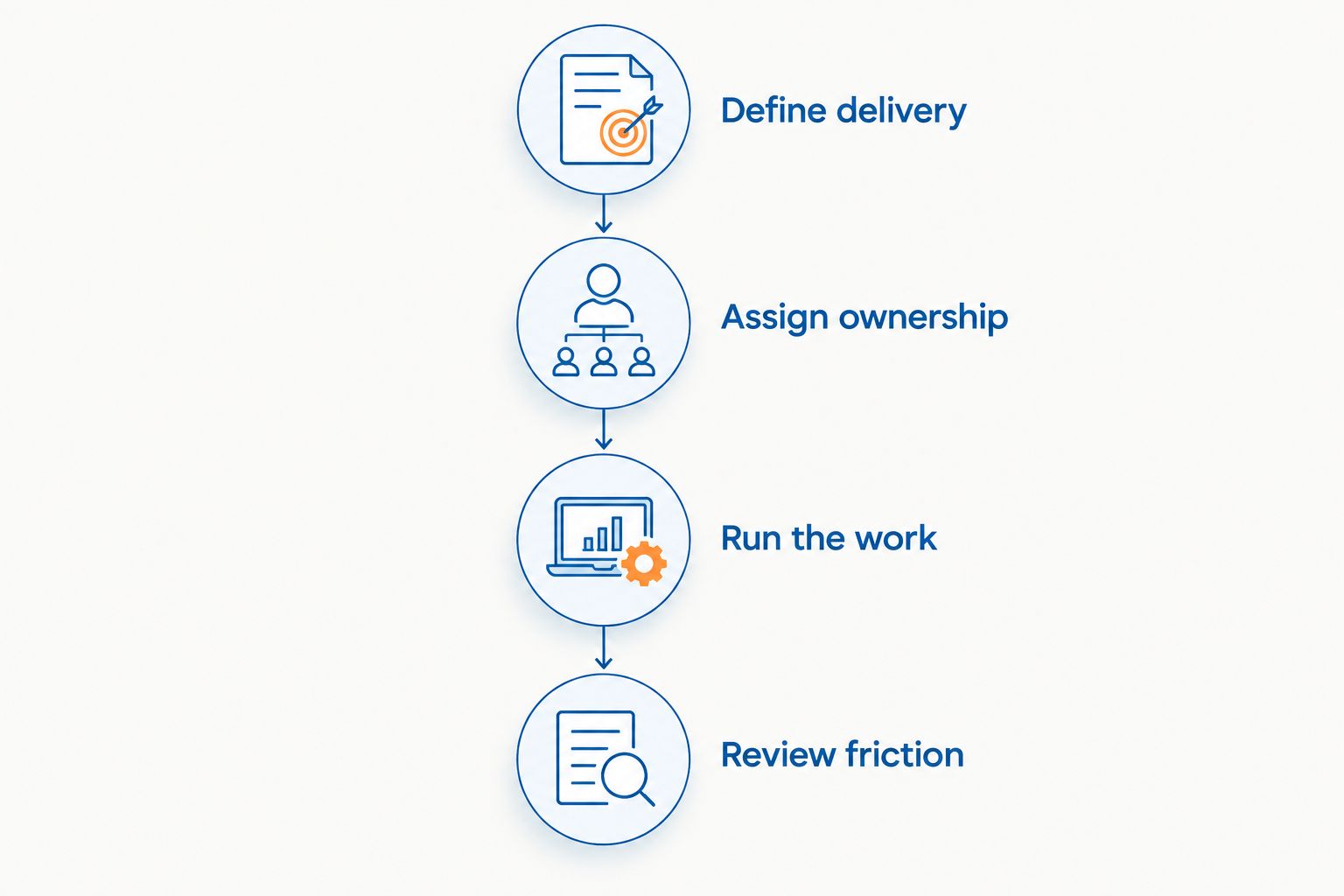
Test whether the team can see ownership and next actions before moving the whole business.
Keep the decision grounded in behaviour. If updates stop as soon as you stop reminding people, fix the update routine before adding more fields or switching platforms.
Which project management tool should you choose?
Choose Asana by default when your small business needs clearer task ownership and coordinated delivery. Choose Trello for a straightforward visual workflow, Basecamp for project communication, ClickUp for configurable operations or Notion for documentation-led work.
You do not need every capability. You need the smallest system that makes commitments visible and keeps the team using it.
Elevatory's business coaching and marketing implementation covers offers, funnels, paid advertising and systems strategy. Keep that distinction clear: a project tool organises execution, while strategic work determines what deserves execution.
FAQ
What's the best project management tool for a small business owner?
Asana is the default recommendation for small business owners who need clear task ownership and coordinated delivery. Trello, Basecamp, ClickUp and Notion fit different needs, so choose according to your main operating constraint.
Is Trello better than Asana for a small team?
Trello is the better fit for a straightforward visual workflow; Asana is the better fit for more structured task coordination. Choose based on the work's complexity rather than team size alone.
Should I use ClickUp or Notion to manage projects?
Choose ClickUp for configurable task workflows and Notion for projects that depend heavily on documentation. Both require deliberate setup, so decide who will maintain the system before adopting either.
Can Basecamp replace scattered project discussions?
Basecamp can give project discussions, to-dos, schedules and files a shared home. Your team still needs clear rules for turning a discussion into an assigned action.
Do I need business coaching or project management software?
Project management software organises execution; business coaching addresses strategic decisions and priorities. Elevatory offers business coaching and done-with-you marketing implementation, not a project management software product.
How do I compare project management tools in 2026?
Compare tools using a real project with defined ownership, workflow stages and a completion standard. Review whether the team can find the next action and keep work updated without maintaining a separate status system.
When should I switch project management tools?
Switch when the current tool cannot represent the workflow your team actually needs. First check whether unclear task names, missing ownership or inconsistent updates are causing the problem; those issues follow you into another platform.
One last thing
Before adding an automation, check the task it will move. If the task has no clear owner or completion standard, automation only moves the ambiguity somewhere else.
Remove unclear commitments before adding software complexity. For your 2026 setup, make every active task explain what happens next and who is responsible.
Related guides
Book a free growth strategy call
Forty-five minutes with a strategist to pressure-test where your business is stuck and what to prioritise next.
Prefer to talk first? Call 1300 634 230 or email chris@elevatory.com.au