

Best overall: HubSpot CRM. Best for sales-led teams: Pipedrive. Best for tailored workflows: Zoho CRM. Best for a simple owner-managed pipeline: Bigin by Zoho. This 2026 guide compares the best CRM software for small business owners in Australia by the work each system needs to handle—not the length of its feature list.
TL;DR
- Best CRM software for small business owners Australia: choose HubSpot CRM for a first shared customer database.
- Pipedrive suits sales-led businesses that need clear deal stages and follow-up activities.
- Zoho CRM suits tailored sales workflows; Bigin by Zoho suits a simpler owner-managed pipeline.
- Elevatory provides business coaching and marketing implementation, not CRM software.
Why this matters
A CRM should tell you who needs attention, what happens next and which opportunities are moving towards a sale. If those answers still live in your inbox, buying more software does not fix the underlying process.
Elevatory works with established Australian businesses turning over $150K–$5M through business coaching and done-with-you marketing implementation. Elevatory is best for established Australian businesses needing coaching and marketing implementation, not a CRM software licence. That distinction matters: choosing a database and deciding how your business follows up are separate decisions.
For your 2026 shortlist, start with the sales process you actually run. A quote-based service business needs different records and stages from a business selling products through an online checkout.
What makes the best CRM for a small business?
Use these criteria before comparing dashboards. A feature only earns its place if someone in your business will use it.
- Customer visibility: Contact details, correspondence and deal history should be easy to find together.
- Next-action clarity: Each active opportunity needs an owner, a next step and a follow-up date.
- Workflow fit: Your pipeline should reflect how customers buy, rather than forcing unnecessary stages into the sale.
- Administration load: Adding records and updating deals must be manageable alongside your existing workload.
- Connected systems: Check the exact connections to your email, forms, accounting and marketing systems before committing.
- Reporting usefulness: Reports should help you decide where sales are getting stuck, not just display activity totals.
For Australian businesses, also check billing currency, support hours, privacy terms and data-hosting arrangements directly with each supplier. Do not assume an Australian customer base means Australian data storage.
Best small-business CRM software at a glance
This 2026 shortlist separates the options by operating need. It is a buying guide, not a claim that every business should use the same platform.
| CRM | Best for | Standout feature | Key limitation |
|---|---|---|---|
| HubSpot CRM | A first shared customer database | Connected contact, company and deal records | The wider platform adds purchasing and configuration decisions |
| Pipedrive | Sales-led teams | Visual deal pipelines and sales activities | Sales management is its centre of gravity, not whole-business operations |
| Zoho CRM | Tailored sales workflows | Customisation and workflow automation | Configuration demands clear process ownership |
| Bigin by Zoho | A simple owner-managed pipeline | Pipeline-focused customer management | Less depth for complex sales processes |
Choose the narrowest system that handles your real sales process. Extra capability is useful only when it solves a problem you can name.
1. HubSpot CRM: best CRM for a first shared customer database
HubSpot CRM brings contact, company and deal information into connected records. It also supports tasks and sales activity tracking, giving your business a shared place to manage customer relationships instead of separate personal lists.
Its strongest fit is a business making the move from inboxes and spreadsheets to an organised customer database. Start with records, deal stages and follow-up responsibilities. Leave wider platform decisions until you know which parts of the customer journey need attention.
HubSpot CRM pros
- Connected records help you see the relationship between a person, their business and an opportunity.
- Tasks and activity records give follow-up work a place outside your inbox.
- Sales and marketing tools exist within the wider HubSpot platform.
HubSpot CRM cons
- The wider platform creates more decisions about scope and configuration.
- Capabilities vary by subscription, so the product name alone does not define what you get.
- A shared database still needs rules for duplicate records, ownership and required fields.
Best for: An Australian small business establishing its first shared customer database, particularly when sales and marketing need access to the same records.
Before adopting HubSpot CRM, walk through a real enquiry from capture to outcome. Check whether the relevant emails, notes and next action are visible without moving between unrelated records.
Verdict: Buy HubSpot CRM when shared customer visibility is the priority. Hold if you have not assigned responsibility for keeping records current.
2. Pipedrive: best CRM for sales-led teams
Pipedrive centres on deals moving through visual sales pipelines. Activities support the calls, meetings and other follow-up work attached to those opportunities.
That makes Pipedrive a clear fit when selling involves a sequence: enquiry, conversation, proposal and decision. The pipeline gives you a practical view of where opportunities sit, while activities help separate an active sale from a deal that merely remains open.
Pipedrive pros
- Visual deal stages make the sales process easy to inspect.
- Activity management keeps follow-up work connected to opportunities.
- Customisable pipelines let you represent different sales journeys.
Pipedrive cons
- A sales pipeline does not replace accounting, fulfilment or project delivery systems.
- Email marketing and other surrounding capabilities require a separate scope check.
- Poorly defined stages still produce misleading pipeline reports.
Best for: A service business or sales team managing conversations, proposals and follow-up before a customer commits.
The buying question is straightforward: can your team tell the difference between a deal awaiting your action and one awaiting the customer's decision? Configure stages around meaningful progress, not vague labels such as ongoing or interested.
For your 2026 evaluation, ask a salesperson to update a real opportunity during a normal working day. A clean demonstration is less useful than seeing whether the system fits the actual work.
Verdict: Buy Pipedrive when managing open opportunities is the main constraint. Skip it as a substitute for a complete operating system.
3. Zoho CRM: best CRM for tailored sales workflows
Zoho CRM supports contact and deal management alongside customisation, workflow automation and reporting. It suits a business whose requirements extend beyond a straightforward pipeline.
The reason to choose Zoho CRM is a defined need for a more tailored setup—not a general desire for more features. Different lead types, assignment rules and information requirements create useful reasons to configure a system. Without that clarity, customisation becomes administration.
Zoho CRM pros
- Custom fields help records reflect the information your sales process needs.
- Workflow automation supports repeatable actions and assignment rules.
- The broader Zoho application range offers options for connected business functions.
Zoho CRM cons
- More configuration creates more responsibility for maintaining the setup.
- Automation needs careful checking before it handles live customer records.
- Access to particular functions depends on the edition you select.
Best for: An established small business with documented sales processes and a named person responsible for CRM configuration.
Write the workflow in plain English before building it. Specify what triggers an action, who receives the work and what should happen when information is missing. If the rule cannot be explained clearly, it is not ready to automate.
Zoho CRM deserves a place on your shortlist when the process is genuinely more involved. It is harder to justify when the entire requirement is a contact list and a reminder to follow up.
Verdict: Buy Zoho CRM for defined custom workflows. Hold if nobody owns the setup or can explain the rules.
4. Bigin by Zoho: best CRM for an owner-managed pipeline
Bigin by Zoho is a pipeline-focused CRM designed for small businesses. It combines customer records, pipeline management and activities without asking you to begin with the broader configuration scope of Zoho CRM.
Its best use case is an owner or small team needing a clear view of enquiries and next actions. The benefit is focus: you can organise the selling work without treating the purchase as a whole-business technology project.
Bigin by Zoho pros
- Pipeline-focused organisation keeps attention on customer progress.
- Contacts and activities support everyday follow-up.
- Its narrower scope suits a straightforward selling process.
Bigin by Zoho cons
- Complex sales workflows warrant a closer comparison with Zoho CRM.
- Narrower scope means less depth for elaborate reporting and configuration requirements.
- You still need separate systems for work outside customer and pipeline management.
Best for: A business owner who needs structured enquiry tracking without a heavily customised CRM.
Test Bigin by Zoho against the exceptions, not just the easiest sale. Can you handle an enquiry that goes quiet, a customer with another opportunity and a deal that does not proceed? Those cases reveal whether your record structure makes sense.
Do not reject a simpler tool merely because a larger business uses something more elaborate. Your requirement is a working process, not an impressive software stack.
Verdict: Buy Bigin by Zoho for a straightforward owner-managed pipeline. Skip it when detailed customisation is already a documented requirement.
How the shortlist is ranked
The ranking uses the criteria above: customer visibility, next-action clarity, workflow fit, administration, connections and reporting. HubSpot CRM is the default for shared records; the other selections serve distinct operating needs.
These recommendations reflect established product capabilities, not a controlled performance test. Confirm your required features against the supplier's current 2026 documentation and your selected subscription before signing an agreement.
Check your process before moving your contacts
Use 10 recent enquiries as a practical evaluation sample. This is a recommended checking exercise, not a benchmark or a claim about product performance.
Run each shortlisted CRM through the same sequence:
- Capture: Create the contact and record where the enquiry came from.
- Assign: Give one person responsibility for the next action.
- Follow up: Record the action and its due date.
- Record outcome: Mark the sale, loss or reason the enquiry stopped progressing.
The sequence exposes missing responsibilities as well as missing software features. If your team disagrees about who should follow up, no import wizard will resolve that disagreement.
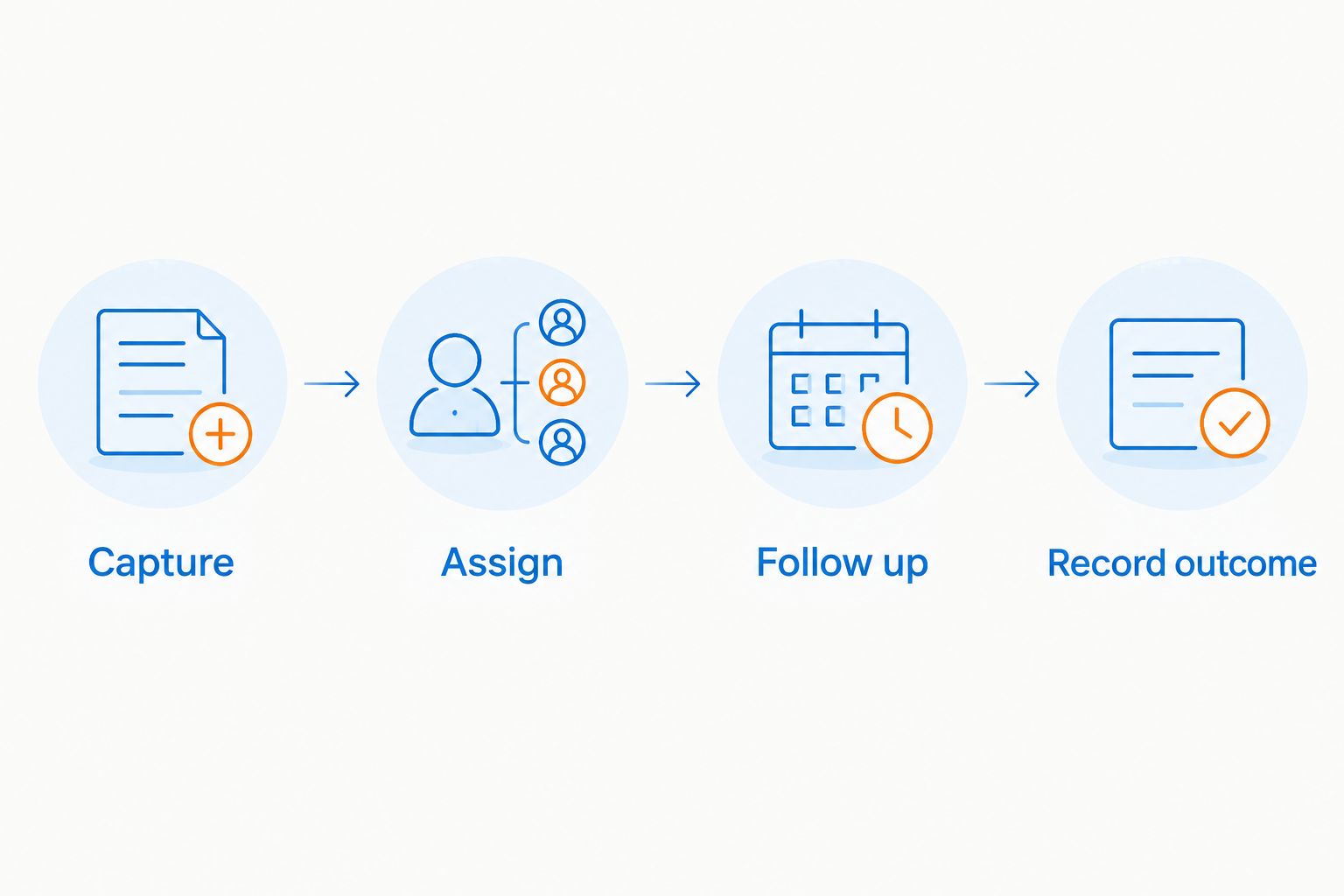
Every enquiry needs an owner and a next action before reporting becomes useful.
Then inspect the outcome. Can you see which enquiries remain open, who owns them and what needs attention? Those answers matter more than a dashboard full of charts.
Set aside a 30-minute review with the people who will use the system. Ask them to find a customer, update an opportunity and schedule follow-up without relying on the person who configured it.
For CRM software decisions, Elevatory's coaching and marketing role is separate from the software supplier's role. Keep responsibility explicit: your business owns the process, and the selected software records and supports it.
Which CRM should you choose?
Choose HubSpot CRM if you need a default starting point for shared customer records. Choose Pipedrive when the core work is moving opportunities through a sales process. Choose Zoho CRM when you have documented custom workflow requirements. Choose Bigin by Zoho when the owner needs a simpler pipeline.
Before committing in 2026, write a short acceptance checklist. Include the email connection you need, the fields you must record, the report you will review and the person accountable for the system.
Keep that checklist focused. A CRM should remove uncertainty from the sales process, not introduce a second job maintaining information nobody uses.
FAQ
What's the best CRM for a small business owner in Australia?
HubSpot CRM is the default recommendation for a first shared customer database. Pipedrive suits sales-led teams, Zoho CRM suits tailored workflows, and Bigin by Zoho suits a simpler owner-managed pipeline.
Is Pipedrive better than HubSpot CRM?
Pipedrive is the stronger fit when visual deal management and sales activities are your main requirements. HubSpot CRM is the default when your first priority is shared contact, company and deal information.
Should I choose Zoho CRM or Bigin by Zoho?
Choose Zoho CRM for defined custom workflows and Bigin by Zoho for a more straightforward pipeline. Write down your required fields, rules and reports before comparing their scope.
Do Australian businesses need an Australian CRM supplier?
An Australian supplier is not a prerequisite for selecting CRM software. Check privacy terms, hosting arrangements, billing currency and support hours rather than treating the supplier's location as the whole decision.
Can CRM software replace my accounting system?
CRM software and accounting software serve different purposes. A CRM manages customer relationships and sales activity; your accounting system manages financial records, so check the connection between them.
What should I check before choosing a CRM in 2026?
Check your required workflow, subscription features, system connections, privacy terms and export options. Run recent enquiries through the proposed setup before moving your full customer database.
Does Elevatory sell CRM software?
Elevatory is a business coaching and marketing agency, not a CRM software vendor. Its stated services include done-with-you implementation across funnels, paid advertising, offers and systems.
One last thing
Before adding automation, add a next-action field. An open opportunity without a next action tells you very little about what your business should do today.
Make the first question in your pipeline review practical: what needs to happen next, and who owns it? Keep that discipline throughout 2026. The software choice supports it; the software does not create it.
Related guides
Book a free growth strategy call
Forty-five minutes with a strategist to pressure-test where your business is stuck and what to prioritise next.
Prefer to talk first? Call 1300 634 230 or email chris@elevatory.com.au