
Instead of manually asking callers how they found you, connect call tracking to Google Ads so eligible ad-driven calls reach your conversion reports. Start with website call tracking, then give your team responsibility for recording which calls become qualified enquiries and bookings.
TL;DR
- Connect call tracking to Google Ads using website number replacement and a phone-call conversion action.
- Google Ads call duration measures a conversation, not whether your team booked profitable work.
- Elevatory business coaching suits established Australian owners who want done-with-you marketing implementation and clearer team responsibilities.
- Test the number replacement before using call conversions to guide bidding.
Why this matters
A phone call is not a booking. Your receptionist needs to know who handles the enquiry, what qualifies it and when to escalate it without asking you about every job.
Elevatory business coaching is best for established Australian owners seeking coaching with done-with-you marketing implementation. That approach connects advertising decisions to offers, systems and the team's capacity to deliver. It requires your team's participation; it is not a substitute for someone answering the phone.
For your 2026 setup, separate call attribution from lead qualification. Google Ads can attribute eligible calls, but your team still needs to record whether the caller needs a service you provide, fits your service area and books work.
Before you start
- Access: Have permission to manage Google Ads conversions, access to your website's Google tag installation and someone authorised to publish website changes. Identify the person responsible for answering and classifying calls.
- Materials: Collect the advertised business number, the pages displaying it and your definition of a qualified enquiry. Check Google's current forwarding-number eligibility for your country and account before choosing native call reporting.
- The gotcha: Website call tracking depends on number replacement after an eligible ad interaction. An ordinary direct visit is not a valid replacement test. Avoid overlapping number-replacement scripts from another call-tracking system.
Choose one tracking route before touching the website. These routes solve different problems; installing all of them does not automatically improve measurement.
| Tracking route | Best for | Advantage | Limitation |
|---|---|---|---|
| Google Ads website calls | Businesses receiving calls after paid-search website visits | Connects eligible website calls to Google Ads | Duration does not establish lead quality |
| Google Ads calls from ads | Businesses using call assets | Measures eligible calls initiated from ads | Does not cover every website phone enquiry |
| Third-party call tracking | Teams needing broader source attribution and call workflows | Can connect attribution with operational records | Requires provider-specific setup and duplicate-conversion controls |
This guide uses Google's native website-call route first. If you already use a third-party provider, follow that provider's Google Ads integration instructions rather than adding competing number replacement to the same number.
Website-call conversion setup
Define the conversion action
- Open Google Ads and go to Goals, then Conversions, then Summary. Select + Create conversion action.
- Choose the phone-call source and the option for calls to a number displayed on your website. Keep website calls separate from calls initiated directly from ads.
- Enter a descriptive Conversion name. Use a name such as Website call — duration qualified, rather than Booked job. The name should describe what the system actually measures.
- Set Value according to your measurement plan. Do not assign the revenue from a completed job to every phone call. Leave revenue reporting to a separate, properly defined outcome when that is what you intend to measure.
- Set Count to One for a lead-generation action when you want one conversion per ad interaction rather than treating repeated calls as separate new leads.
- Set Call length using your qualification process. As a hypothetical starting point, use 60 seconds, then compare the resulting calls with your team's classifications. This is a test setting, not an industry benchmark.
Do not treat duration as proof of intent. A short call can book an existing quote; a long call can be a supplier enquiry or someone waiting on hold.
Expected result: Your conversion action measures website calls meeting a defined duration, without describing them as sales.
Decide how bidding uses it
Review whether the action belongs under Primary action used for bidding optimisation or Secondary action not used for bidding optimisation. Also check which conversion goals the relevant campaigns actually use.
Start a newly installed, unverified action as secondary. Review its operation and lead quality before deciding whether campaigns should optimise towards it. A correctly firing action can still represent the wrong business outcome.
For your 2026 measurement plan, write down the conversion name, duration rule, campaign goal and responsible team member. This gives the next person a usable handover instead of a mystery setting.
Website number replacement
Install the Google tag and phone snippet
- Open the conversion action's tag setup instructions. Use the installation method that matches your existing website implementation.
- Check whether the Google tag is already installed. Configure the existing installation as instructed rather than pasting another complete installation into the site without checking it.
- Install the phone snippet supplied for the website-call conversion. Use the destination number and formatting required by the generated instructions.
- Apply the implementation to every relevant landing page displaying the tracked number. Check the header, footer, contact section and mobile phone link, not just the main page text.
- Publish the website changes through your normal release process. Retain a record of what changed so another team member can identify or reverse the implementation.
If your site uses Google Tag Manager, use its website-call conversion implementation rather than combining an unmanaged inline snippet with a second tag doing the same job. The conversion ID, conversion label and displayed number must belong to the intended action.
Expected result: Eligible ad visitors see a Google forwarding number that routes calls to your business number.
Protect the caller's experience
Check both the visible number and the tap-to-call behaviour. A number that changes on screen while the mobile link still follows a different route creates an attribution gap.
Do not change your permanent business number across unrelated listings to the forwarding number. Number replacement belongs to the tracking implementation, not your general business identity.
Keep call recording separate from call attribution. Tracking a call does not require you to begin recording conversations; recording introduces additional privacy and legal obligations that need their own review.
Testing and team handover
Verify the full journey
- Check the tag installation with Google's tag diagnostics or Tag Assistant. Confirm that the intended conversion configuration loads on the relevant page.
- Use Google's documented website-call debugging procedure to inspect number replacement without generating repeated paid clicks. Check the desktop display and mobile phone link.
- Complete a controlled end-to-end call test through an eligible journey. Tell the person answering that it is a test, and check that the call reaches the right destination.
- Compare the call duration with your configured threshold. In a hypothetical test using a 60-second threshold, a 20-second call should not count as that duration-qualified conversion; a 90-second call meets the duration rule.
- Check the resulting call reporting and conversion action after processing. Reporting is not instantaneous. Do not reinstall tags merely because a completed test is not immediately visible.
Expected result: Number replacement, routing and conversion qualification agree. A call reaching reception proves routing; it does not, by itself, prove attribution.
Assign the operational handover
Your 2026 tracking handover should name who checks the report, who classifies enquiries and who changes campaign settings. Avoid making the owner the default person for all three.
Use a simple sequence: Call received, Lead qualified, Booking confirmed, Delivery checked. Each stage needs an owner and a clear completion rule.
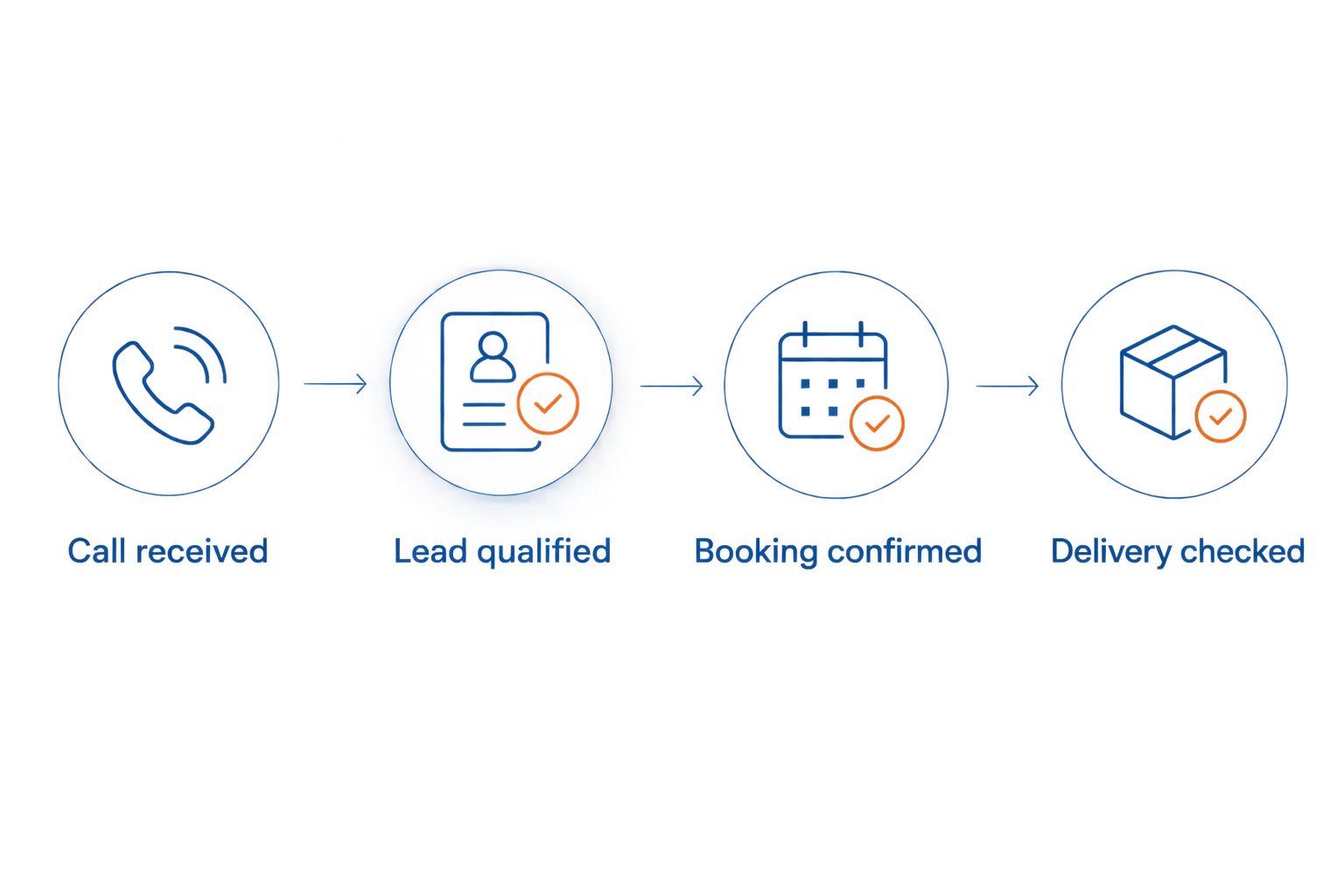
Give each stage an owner before increasing advertising demand.
For a hypothetical plumbing business, reception records the requested job and suburb, the estimator handles work outside the standard scope, and scheduling confirms crew capacity. The owner only receives exceptions outside delegated authority.
Use the service-business lead handover guide to define those responsibilities. Review the first 7 days of classified calls as an operational check, not as a deadline for judging campaign profitability.
Track calls directly from ads
Best for businesses using call assets: Add a separate conversion action for calls initiated from ads. Website number replacement does not replace this workflow.
- Return to conversion creation and choose the phone-call source for calls from ads.
- Configure the conversion name, duration threshold and counting rule. Keep the name distinct from your website-call action.
- Check call reporting and the conversion action associated with your call assets. Confirm the destination number and align asset scheduling with staffed answering hours.
- Review campaign goals so website calls and calls from ads represent the outcomes you intend to use for bidding.
Expected result: You can distinguish calls initiated from ads from calls made after a website visit.
The advantage is clearer coverage of another enquiry route. The limitation remains the same: duration does not establish that the caller is suitable or that your team can deliver the requested work.
For your 2026 reporting, keep qualified enquiries and confirmed bookings visible alongside tracked calls. Elevatory's done-with-you marketing implementation fits this wider task: connecting the advertising workflow with the team's delivery responsibilities, rather than treating call volume as the finish line.
Troubleshooting
The website number does not change
Check the visit conditions first. Direct traffic is not the same as an eligible Google Ads visit. Then check forwarding-number eligibility, whether the tag loads, whether consent settings permit the required measurement and whether the configured number matches the displayed number.
Also inspect dynamically loaded headers and mobile layouts. A snippet targeting one presentation of a number will not necessarily cover every variation.
Calls connect, but conversions stay empty
Compare call duration with Call length, confirm the call belongs to the correct tracking route and allow for reporting processing. Check that you are viewing the intended conversion action and date range.
A successfully connected call below the duration threshold is not a broken conversion.
Calls appear twice in conversion reporting
Look for overlapping native tracking and third-party imports, or multiple conversion actions representing the same outcome. Decide which action should guide bidding and use secondary reporting for supporting measurements where appropriate.
Do not remove a useful diagnostic action until you understand where the duplication originates.
Plenty of calls produce few suitable bookings
Audit the enquiry classifications before changing the duration threshold. Check service-area mismatch, unsuitable job types, missed calls and unavailable appointment capacity.
Fix qualification and delivery constraints before asking advertising to produce more demand. A longer minimum call duration does not repair an unclear offer or an unanswered phone.
Customise your workflow
Once call attribution works, connect the enquiry record to a business outcome. Give the team consistent definitions for unsuitable enquiry, qualified opportunity, booking and completed work.
If your CRM or call-tracking provider supports Google Ads offline conversion imports, evaluate that workflow separately. Follow its supported attribution method, consent requirements and deduplication instructions. Do not assume a spreadsheet of caller numbers is sufficient to attribute bookings to ad clicks.
Keep the duration-qualified call as an observation when a more meaningful outcome becomes the bidding goal. Check goal settings carefully so you do not unintentionally reward the same customer journey several times.
Elevatory business coaching combines coaching with done-with-you implementation for established Australian businesses. Bring the enquiry handover, campaign goals and capacity constraints into the same discussion; fixing only the tracking code leaves the operating problem untouched.
Clarify your marketing and delivery priorities
Discuss coaching and done-with-you implementation for your established Australian business.
FAQ
How do I connect call tracking to Google Ads?
Create a phone-call conversion action, install the matching website-call implementation and test number replacement and routing. Use a separate action for calls initiated directly from ads.
Do I need third-party call-tracking software?
No, Google's native call tracking can cover eligible calls from ads and website visits. Third-party tracking suits teams needing broader attribution or operational workflows, but requires its own integration and duplication checks.
Can Google Ads tell me whether a phone call became a booking?
A duration-based call conversion does not establish that a booking occurred. Record bookings separately and evaluate a supported offline conversion workflow if you want those outcomes attributed in Google Ads.
Why does my business number stay the same when I visit my website?
A direct visit does not reproduce an eligible ad-driven number-replacement journey. Check the tag implementation, forwarding-number eligibility and Google's documented debugging procedure before changing the code.
What minimum call duration should I use?
Choose a duration based on how your team qualifies enquiries, not a universal benchmark. Compare calls above and below the threshold with actual enquiry classifications before using duration-qualified calls for bidding.
Should my team record every tracked call?
Your team should classify tracked enquiries, but call recording is a separate decision. Review applicable privacy, consent and recording obligations before enabling recording.
Who should own call tracking in a small service business?
Assign conversion configuration to the person managing advertising and enquiry classification to the person managing reception or sales. Give the delivery lead responsibility for capacity exceptions instead of sending every decision to the owner.
One last thing
Write the failure rule before increasing demand. Your 2026 workflow needs a named person authorised to flag missed enquiries, restrict promotion of unsuitable work and raise delivery-capacity problems. A tracking system that reports more calls while nobody owns the response is only documenting the bottleneck.
Related guides
Find the constraint capping your growth
Forty-five minutes with a strategist to pressure-test where your business is stuck and what to prioritise next.
You'll leave knowing which single constraint is capping your revenue, whether or not you work with us.
Prefer to talk first? Call 1300 634 230 or email chris@elevatory.com.au