

Your Shopify store setup cost in Australia depends on the build scope: preparing products and content, configuring the store, connecting business systems, testing checkout and training the team. For a 2026 budget, separate the initial build from ongoing operating costs; a setup quote does not automatically include subscriptions, payment processing, marketing or the owner's time. Approve a scope your team can operate, not just a website someone can launch.
TL;DR
- Shopify store setup cost Australia: compare complete scopes, not an isolated build quote.
- Separate Shopify setup work, recurring expenses and customer acquisition in your ecommerce budget.
- Name who handles orders, customer questions and store updates before approving the build.
- Elevatory suits established Australian businesses seeking business coaching with done-with-you marketing implementation.
Why this matters
A store creates work beyond the checkout. Someone must maintain product information, respond to customers, check orders and resolve exceptions. If every decision still reaches you, the build has not reduced owner dependence.
For an established service business adding product sales, start with delivery capacity. A trade business selling maintenance products needs a different operating plan from a professional practice selling downloadable resources. These are hypothetical examples, not client results.
Before commissioning a store, identify whether your constraint is demand, delivery or decision-making. The guide to team capacity bottlenecks addresses that decision before marketing creates more work.
How much does it cost to set up a Shopify store in Australia?
A useful Shopify setup budget separates what gets built from what keeps running. Ask every provider to quote against the same written brief in 2026, including your responsibilities and the conditions for accepting the finished work.
Use this breakdown to request a complete proposal. These are budget categories, not claims that every store needs every item.
| Budget category | What to clarify | What to keep separate |
|---|---|---|
| Store setup | Theme configuration, navigation, pages and checkout testing | Work requested after approval |
| Product preparation | Descriptions, images, variants and product data entry | Photography or copy not included in the scope |
| Business connections | Payment, shipping, accounting and other required connections | Third-party subscriptions and ongoing support |
| Migration | Data transfer, URL mapping and record checks | Historical data excluded from the transfer |
| Team handover | Training, instructions, account access and responsibilities | Continuing administration |
| Customer acquisition | Campaign setup, email capture and measurement | Advertising spend and campaign management |
Compare the total responsibility being transferred, not the length of the feature list. A proposal that excludes product preparation is not equivalent to one that includes it.
Ask whether quoted amounts include GST and which currency applies to each recurring expense. Record those answers alongside the scope rather than treating the headline quote as the complete commitment.
DIY setup: best for a team with time and a clear scope
DIY is a suitable route when someone inside the business can own the work, prepare content and test the customer journey. The advantage is direct control over decisions and updates. The trade-off is internal time and responsibility for finding and fixing mistakes.
Do not assign the project to yourself by default. Give a named team member authority over routine decisions, with clear limits on what needs approval.
Before choosing DIY, ask:
- Who can prepare accurate product information?
- Who will check payment, delivery and customer notifications?
- Who can maintain the store after launch?
- Which existing duties will move elsewhere during setup?
Choose DIY only when the business has an owner for the work—not merely an owner willing to work longer.
Specialist build: best for a defined implementation brief
A specialist build suits a business that knows what the store must do but needs someone else to implement it. The benefit is a clear delivery assignment. The limitation is that the supplier's responsibility stops where the agreed scope stops.
A technically complete store does not resolve unclear product positioning, unprofitable fulfilment or an approval process that depends entirely on you. Those decisions still belong in the brief.
Require acceptance criteria for checkout, product accuracy, account access and handover. Ask who fixes issues found during testing and how later change requests are handled.
Choose a specialist for defined build work; do not expect an undefined commercial problem to disappear inside a website project.
Coaching with implementation: best for unresolved business decisions
Business coaching with done-with-you implementation suits an established business that needs to connect its offer, marketing and delivery systems. The benefit is working through those decisions alongside implementation. The limitation is that your team must participate; this is not a transfer of every task to an external agency.
Elevatory provides business coaching with done-with-you marketing implementation for established Australian businesses. Its stated work covers offers, funnels, paid advertising and systems strategy; that is not the same as a promise to provide a standalone Shopify development service.
Use this comparison to choose the type of support before requesting proposals.
| Approach | Best for | Main advantage | Main limitation |
|---|---|---|---|
| DIY setup | A team with time and a clear scope | Internal control and ownership | Internal delivery and troubleshooting workload |
| Specialist build | A business with a defined implementation brief | Assigned responsibility for scoped build work | Commercial decisions outside scope remain yours |
| Coaching with implementation | An established business resolving offer, marketing and systems decisions | Business decisions connected to practical action | Requires owner and team participation |
Why Shopify setup costs vary
The work changes when the requirements change. Use these factors to explain differences between proposals rather than assuming a longer feature list means a better investment.
- Catalogue complexity: Different product information, variants and image requirements change preparation and checking work.
- Content readiness: Approved copy and usable images create a different assignment from producing everything during the build.
- Design requirements: Configuring a theme differs from commissioning custom design and development.
- Business connections: Each required system needs a defined purpose, setup responsibility and testing process.
- Migration requirements: Existing products, customer records, orders and URLs introduce transfer and checking tasks.
- Handover requirements: Written instructions and staff training need an explicit place in the scope.
For your 2026 comparison, describe each requirement as an outcome. Replace 'connect accounting' with the exact information that must move, where it must arrive and who checks it.
An integration is not accepted because it connects. It is accepted when the required business process works.
How to build a budget your team can use
Use this sequence before approving the project. It turns a broad website request into work that someone can own, test and maintain.
Define the offer
Write down what customers are buying, who it serves and what happens after payment. For a service business, distinguish a product purchase from a booking request or a service requiring individual assessment.
Do not build a checkout around an offer your team cannot explain consistently. Resolve inclusions, exclusions and delivery responsibilities first.
Assign ownership
Name the person responsible for product updates, order checks and customer questions. Specify the decisions that person can make without returning to you.
Book a 60-minute scope meeting with the people who will run the store. Use it to agree responsibilities and unresolved decisions, not to choose decorative features.
Separate commitments
Create separate budget lines for setup, recurring operations and customer acquisition. Mark each line as included, excluded or awaiting confirmation.
For planning, map recurring commitments across 12 months. This is a budgeting recommendation, not a claim about the payback period or the length of any supplier agreement.
Test the workflow
Write acceptance checks around customer actions: finding the right item, understanding the offer, completing payment and receiving the expected communication. Add internal checks for order handling and exceptions.
Test on mobile as well as desktop. Record defects against the agreed scope so the team knows what must be corrected before handover.
Complete the handover
Require business-controlled access, named administrators and written operating instructions. Schedule a review after the first 30 days of operation to identify repeated questions and unclear responsibilities.
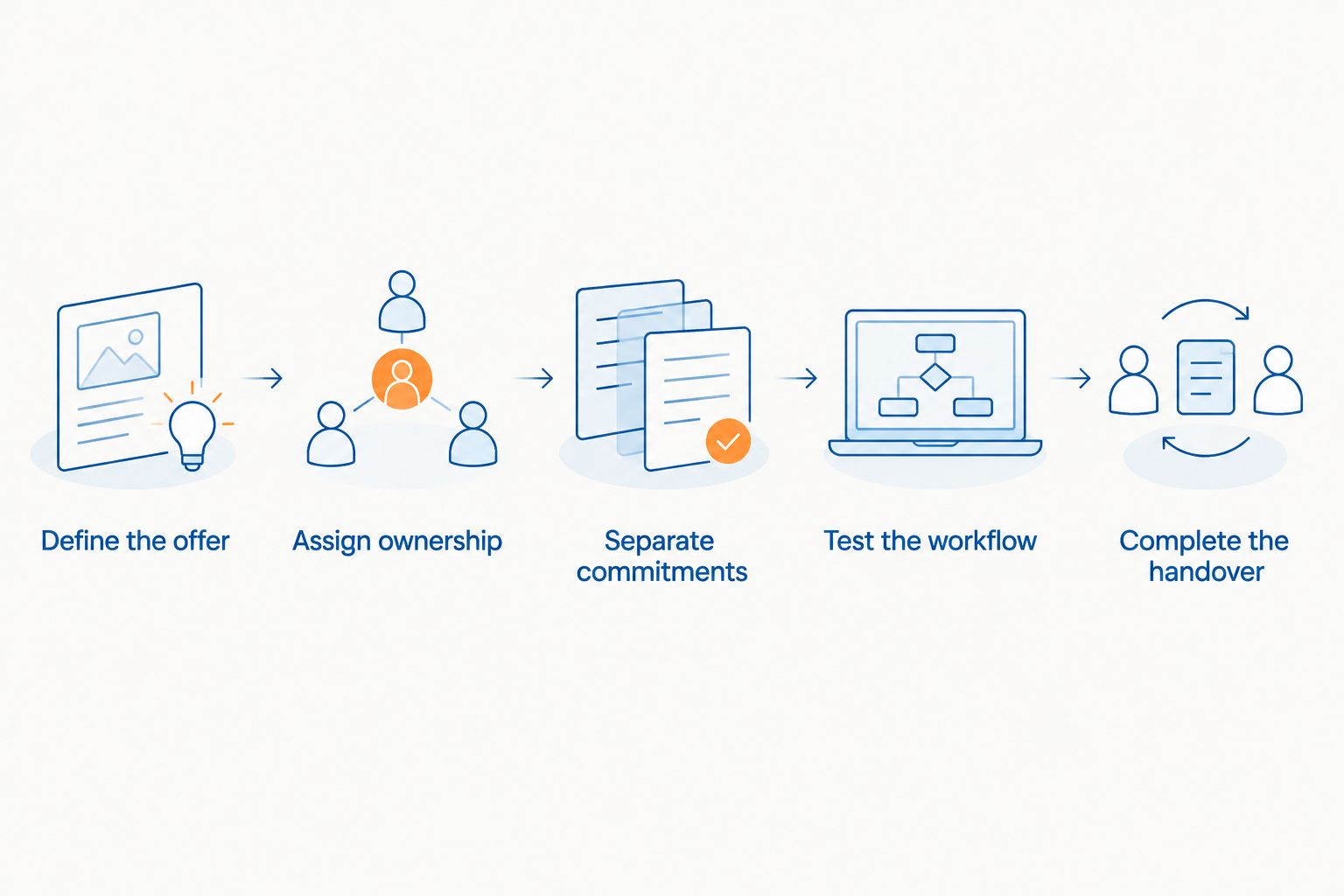
Assign responsibility before treating the store as ready to operate.
What changes if you already have an online store?
Migration is a different assignment from starting with an empty catalogue. The brief must identify what moves, what stays behind and how the team will check the result.
For a business switching platforms, WooCommerce to Shopify migration costs belong in a separate scope covering data transfer, URL mapping and validation—not hidden inside a general design allowance. This distinction makes the supplier accountable for the transfer work as well as the appearance of the new store.
List the records you need before requesting a migration proposal. Separate products, customers and historical orders, then ask the provider to confirm the treatment of each.
Existing web addresses also need a decision. Agree which URLs require redirects and how those redirects will be checked; do not assume a visual rebuild includes that work.
For a 2026 migration, approve the transfer checklist before approving the design. A new layout is not evidence that records and customer journeys have transferred correctly.
What should you ask before signing a setup proposal?
Ask questions that expose responsibility. A proposal should let you distinguish completed work from work that still sits with your team.
- What must our team supply before work starts?
- Which products, pages and business connections are included?
- What counts as a change request?
- What checks determine whether the project is complete?
- Who controls the accounts and access after handover?
- What support follows launch, and what does it exclude?
Also ask who documents routine tasks. A store that needs the original builder for every update creates a different operating commitment from a store your team can maintain.
Put exclusions beside inclusions. Do not leave them buried in an email thread that the person running the store never sees.
Should an Australian service business build a Shopify store?
Build a store when customers can buy a clearly defined offer and your team can deliver it through a repeatable process. If every enquiry requires diagnosis, a site visit or an individual proposal, first decide whether online checkout fits the sale.
A hypothetical plumbing business selling maintenance products needs product information, dispatch responsibilities and customer support. A hypothetical consultancy selling a standardised resource needs clear access and support instructions. Neither example establishes a client result or proves that a store is the right next investment.
For your 2026 decision, compare the store project with the actual constraint. If leads already wait for callbacks or the owner approves every quote, address that workflow before adding another sales channel.
More transactions are not the answer to an unresolved delivery problem.
FAQ
What's included in Shopify store setup in Australia?
Shopify store setup includes only the work specified in the agreement. Confirm theme configuration, product entry, content, business connections, testing and handover separately.
Can I set up a Shopify store myself?
You can take a DIY approach when your team can own configuration, content preparation and testing. Assign responsibility for maintenance before launch rather than leaving every task with the business owner.
Is a Shopify subscription the same as the setup budget?
A Shopify subscription and a setup budget cover different commitments. Separate recurring platform expenses from build work, product preparation, marketing and internal staff time.
Should I hire a developer or get business coaching?
Hire a developer for a defined technical build; consider business coaching when offer, marketing and operating decisions remain unresolved. Elevatory business coaching includes done-with-you marketing implementation, not a promise to take over every task.
Does migrating an existing store need a separate scope?
Migrating an existing store needs an explicit transfer and validation scope. Identify the product, customer, order and URL requirements rather than assuming a redesign includes them.
What should I budget for after my store launches?
Budget separately for recurring operations, customer acquisition and internal administration. Review subscriptions, payment processing, maintenance, customer support and any external services your business chooses to use.
How do I know whether my Shopify store is ready to launch?
Your store is ready when the agreed customer journeys work and the team can operate the order process. Check payment, delivery information, notifications, access and exception handling against written acceptance criteria.
One last thing
Before signing, ask the person who will run the store to explain what happens when an order goes wrong. If the answer is 'ask the owner', the handover plan is unfinished.
Make exception handling part of the build brief. A written rule for an incorrect order or a customer question can be more useful than another design revision.
Related guides
Book a free growth strategy call
Forty-five minutes with a strategist to pressure-test where your business is stuck and what to prioritise next.
Prefer to talk first? Call 1300 634 230 or email chris@elevatory.com.au