

Instead of manually chasing every Google Ads enquiry, build a workflow that qualifies the job, assigns a team member and confirms a quote appointment against real capacity. This Google Ads to booked quotes workflow connects advertising to your booking process without making the owner the default dispatcher.
TL;DR
- Build your Google Ads to booked quotes workflow around team capacity, qualification and confirmed appointments.
- Elevatory pairs business coaching with done-with-you marketing implementation for established Australian businesses.
- Keep form submissions separate from booked quotes in your records and conversion tracking.
- Assign every enquiry an owner, a next action and a due time.
Why this matters
An enquiry is not a booked quote. A booked quote is not an accepted job, either. Your team needs to know which stage each customer has reached before advertising performance means anything.
For your 2026 workflow, define a booked quote as a confirmed appointment with a suitable customer, an assigned estimator and an agreed time. A form submission alone does not meet that definition.
Elevatory is best for established Australian business owners seeking business coaching with done-with-you marketing implementation. That support connects offers, funnels, paid advertising and systems; it does not replace your team's responsibility for responding and delivering.
Start with the constraint. If every enquiry waits for the owner to decide whether it is suitable, another campaign will feed the same queue.
Before you start
- Access: Have permission to edit Google Ads, your website form, customer records and the quoting calendar. Assign a booking coordinator and a backup before connecting anything.
- Materials: Write down accepted job types, service areas, qualification questions, appointment lengths and who can approve exceptions. Confirm which team members can attend quotes.
- The tracking gotcha: Campaign tags are not the same as a Google click identifier. If you plan to import booked-quote conversions using click identifiers, confirm that your form captures and retains the relevant identifier through submission. Do not assume a source field is enough.
Use your existing customer management system where it supports the process. This guide specifies the records, rules and tests to configure, rather than assuming a particular CRM or booking tool. Field names below are names to create, not claims about built-in buttons.
Quote capacity and booking rules
Set the appointment rules
- Assign responsibility. Nominate a booking coordinator who can qualify enquiries and reserve quote appointments without owner approval inside agreed limits.
- Define capacity. Review the estimator's calendar, including travel, existing jobs and administration. Release quote appointments only within the capacity left over.
- Write the acceptance rules. Specify supported job types, suburbs, site requirements and exclusions. Give the coordinator clear reasons to accept, decline or escalate an enquiry.
- Set a response standard. As a starting internal rule, assign new enquiries within 15 minutes during staffed hours. Choose a different target if your team cannot reliably meet it; this is a proposed operating standard, not an industry benchmark.
- Set an escalation rule. Route technical uncertainty to a nominated trade lead. Reserve owner escalation for decisions outside delegated authority.
Expected result: Your coordinator can explain which enquiries qualify, who handles them and which quote slots can actually be offered.
For example, a hypothetical plumbing business might allow its coordinator to book supported residential jobs within its service area, while routing unfamiliar commercial work to a trade lead. The owner does not need to inspect every form.
Choose the booking route
Use the route that matches the information needed before an estimator travels. Neither route removes the need for capacity checks.
| Booking route | Best for | Advantage | Limitation |
|---|---|---|---|
| Qualification before booking | Jobs needing scope, access or technical checks | Your team confirms suitability before reserving travel time | Requires a staffed response process |
| Customer-selected appointment | Clearly defined services with predictable appointment requirements | Customers can choose from eligible slots | Needs booking restrictions and a process for unsuitable requests |
Start with qualification before booking when job scope varies. Add customer-selected appointments only after your team has clear rules for eligibility, duration and travel.
Lead capture and customer records
Configure the enquiry record
- Map the form fields. Capture name, contact details, job type, suburb and a short description. Add access details or photos only where they change the qualification decision.
- Create the tracking fields. Store landing page, campaign information, submission time and any supported Google click identifier. Keep attribution fields separate from the customer's job description.
- Create the workflow fields. Add Lead owner, Lead status, Next action, Action due, Appointment time and Outcome reason.
- Define duplicate handling. Match against existing contact details and check for an open enquiry. Append a new interaction to an existing enquiry where appropriate, rather than automatically creating another booking.
- Test the complete submission. Send a test enquiry through the published form. Confirm that the job information and tracking fields arrive in the correct record.
Expected result: A submitted form creates or updates a usable enquiry record with source information, an accountable person and a next action.
Do not ask for every detail you might eventually need. Ask for what your coordinator needs to decide the next step. A lengthy form still fails if it omits the suburb or service required.
Preserve attribution deliberately
For Google Ads traffic in 2026, check whether auto-tagging is enabled and whether redirects preserve its parameters. Test the actual advertising landing-page route, including any separate booking domain.
Keep campaign naming consistent enough to distinguish services and locations. A customer record labelled only Google does not tell your team which advertised offer produced the enquiry.
Document how customer information moves between the form, CRM and any conversion upload. Collect and use that information under applicable privacy requirements and your disclosed practices. Tracking requirements do not justify collecting unrelated customer information.
Assignment and appointment confirmation
Configure the handover
- Trigger on a new enquiry. Use a successful form submission or newly created enquiry record, not a page view, as the operational trigger.
- Assign the lead owner. Route by job type, service area or roster. If the nominated coordinator is unavailable, assign the backup rather than leaving the record unassigned.
- Create a contact task. Include the customer's details, job description and qualification questions. Apply your staffed-hours response rule to Action due.
- Qualify the request. Confirm scope, location, access and whether an on-site quote is appropriate. Record an outcome even when the job is unsuitable.
- Reserve the appointment. Check estimator capacity and travel before offering a time. Record the agreed appointment against the enquiry and calendar.
- Confirm the details. Send the date, local time, address and purpose of the visit. Include a clear way to request a change.
Expected result: A qualified enquiry becomes a confirmed appointment with an assigned estimator. An unsuitable enquiry gets a recorded reason, not a forgotten task.
Use these stages in your 2026 workflow: New enquiry, Contact attempted, Qualified, Quote booked, Quote attended and Closed. Store accepted, declined, cancelled and unsuitable outcomes separately so closed records remain meaningful.
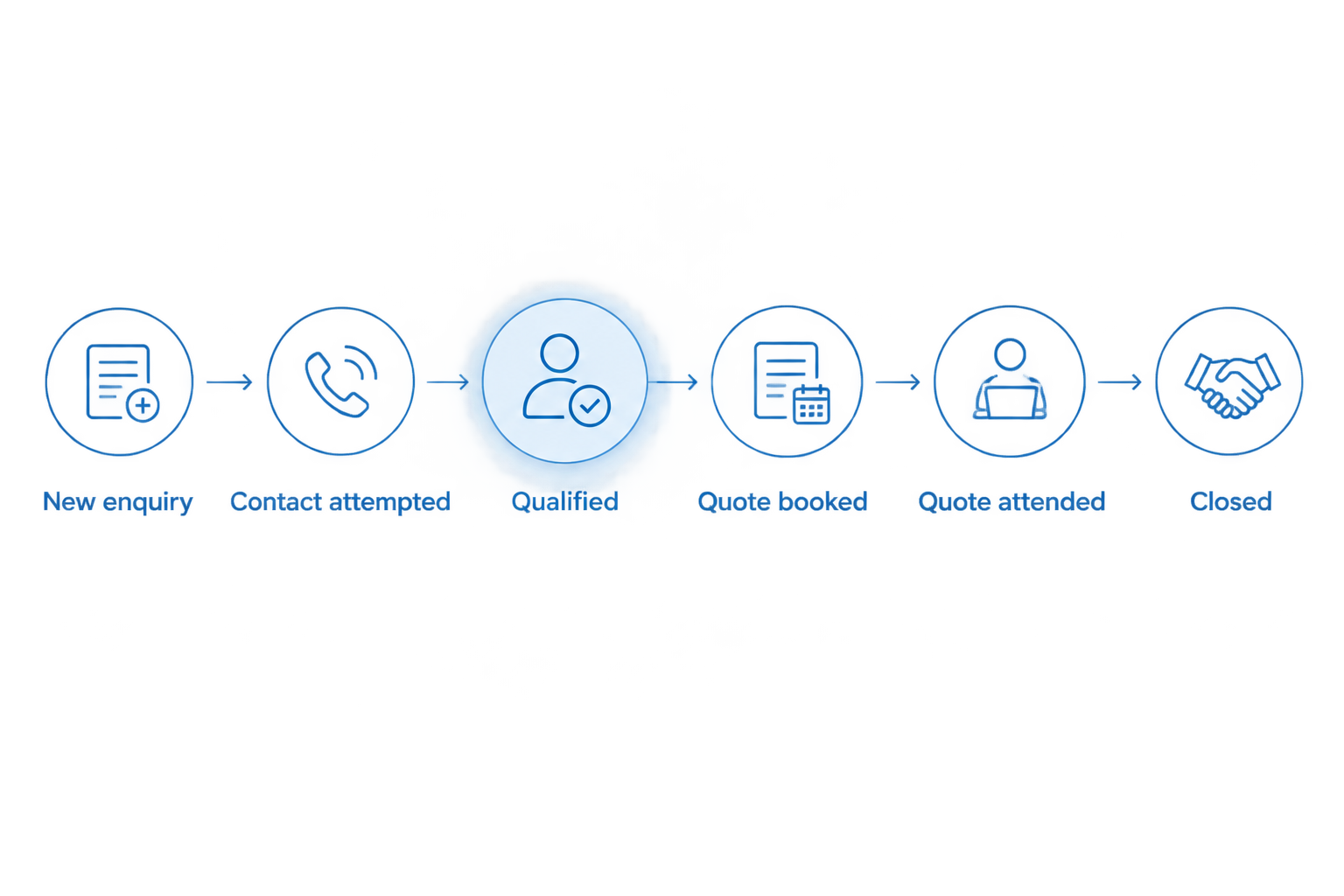
Only move an enquiry to Quote booked after confirming the appointment.
The system should remove copying and chasing, not judgement. A coordinator still needs authority to reject work outside scope and protect the estimator's calendar.
If the handover keeps returning to the owner, tighten service-business lead handover responsibilities before adding more automation.
Add acknowledgement without pretending it is qualification
Once the record and assignment tests pass, add a transactional acknowledgement. State that the enquiry was received and explain the next step. Do not say the appointment is confirmed before a suitable slot has been agreed.
You can automatically text new leads to acknowledge receipt while the assigned coordinator checks suitability; the message does not replace qualification or confirm a booking.
Keep transactional replies separate from promotional messaging. Check the requirements that apply before sending automated SMS, and provide a workable reply path.
Booking outcomes and Google Ads measurement
Configure conversion feedback
- Separate the events. Record enquiry submission and confirmed quote booking as different conversion actions. Do not rename a form submission as a booked quote.
- Choose the bidding outcome deliberately. In Google Ads, check the conversion action's Action optimisation setting and whether the relevant campaign goal uses it. Review Primary and Secondary settings so raw enquiries and bookings do not unintentionally compete as equivalent outcomes.
- Connect the booking event. Where supported, send the confirmed booking through your chosen offline conversion or enhanced conversions for leads setup. Follow that method's identifier, consent and formatting requirements.
- Prevent duplicate uploads. Send the booking when the enquiry first enters the confirmed stage. Use the selected import method's supported deduplication fields rather than treating every later edit as another booking.
- Check acceptance and reconciliation. Review upload diagnostics and compare accepted records with CRM bookings. Investigate discrepancies before changing campaign goals.
Expected result: Your reporting distinguishes people who enquired from people who booked, with a documented path back to the advertising interaction where matching succeeds.
Do not switch bidding to booked quotes solely because the connection exists. Validate the event, matching and reporting first. An incorrectly configured downstream event gives the campaign the wrong instruction.
Measure the result your team can verify. Elevatory's business coaching and marketing implementation scope includes systems strategy, but your booking definition and staff responsibilities still need to be explicit.
Use a small operating scorecard
For your 2026 review, track enquiries, qualified enquiries, booked quotes, attended quotes and accepted jobs. Keep cancellation and rejection reasons alongside those counts.
Calculate cost per booked quote as advertising spend divided by confirmed quote bookings for a consistently defined reporting period. Keep spend separate from job profitability: an accepted job still needs to cover its delivery costs.
Review the scorecard for 30 minutes each week as a starting management routine. This is a suggested review duration, not a performance benchmark. Ask where suitable customers stopped progressing and who owns the fix.
When a quote appointment changes
Run a second workflow when an existing appointment is rescheduled or cancelled. Updating the original booking is different from generating a new lead.
- Match the change to the existing enquiry and appointment identifier.
- Update the estimator's calendar and remove obsolete reminders.
- Confirm revised details with the customer, or record the cancellation reason.
- Return unresolved enquiries to the coordinator with a new next action.
- Review whether the conversion method supports an adjustment when a previously reported outcome needs correcting.
Expected result: Your calendar and customer record agree, and a reschedule does not appear as another newly acquired customer.
Do not silently delete cancellations. They help distinguish poor-fit advertising from scheduling problems and customer changes.
Troubleshooting
Enquiries arrive without an assigned person
Check routing rules, roster coverage and whether the integration account can create tasks. Add an exception queue with a named supervisor; an error notification without an accountable recipient is not a handover.
Tracking fields disappear before submission
Test redirects, embedded forms and movement between domains. Confirm that identifiers reach the final stored record, not just the landing page, and separate genuine missing identifiers from broken capture.
The same customer receives duplicate messages
Check whether both the form and CRM trigger the same acknowledgement. Choose one sending system, then test a repeated submission against an existing enquiry before restoring automation.
Booked quotes exceed calendar capacity
Check appointment duration, travel allowances and whether different booking routes share the same calendar. Pause automatic slot confirmation until the team can explain the mismatch.
Google Ads and CRM totals disagree
Compare conversion dates, reporting windows, time zones, rejected uploads and matching rules. CRM bookings and attributed advertising conversions describe different sets of records; investigate the difference rather than forcing totals to match.
Customise your workflow
Complete a 2026 acceptance check before expanding campaigns. Test 3 enquiries: a suitable job, an out-of-area request and an existing customer returning with another request. These are test scenarios, not customer results.
Confirm that each reaches the right person and stage without owner intervention. Then test a cancellation and a reschedule against the original record.
Best for established owners who need coaching plus implementation: Elevatory connects business coaching with done-with-you work on offers, funnels, paid ads and systems. The trade-off is participation: your team must supply capacity rules, make operating decisions and maintain the process.
Discuss your booking workflow
Discuss the responsibilities, capacity rules and marketing handovers your business needs.
FAQ
What is a Google Ads to booked quotes workflow?
A Google Ads to booked quotes workflow moves an advertising enquiry through qualification, assignment and confirmed quote booking. It also records outcomes so your team can distinguish enquiries from appointments and accepted jobs.
Should customers book a quote straight from the ad?
Direct booking suits services with clear eligibility rules and predictable appointment requirements. Use qualification first when scope, access or travel needs checking before reserving estimator time.
Do I need a new CRM to automate quote bookings?
You do not need a new CRM if your existing system supports the required records, assignments, calendar handover and integrations. Test those capabilities before changing software.
Can Google Ads track a quote booked after a phone call?
Google Ads supports offline conversion measurement when the required matching information and setup are in place. A phone call alone does not establish that a quote appointment was booked; your team must record that outcome separately.
How quickly should a trades business respond to enquiries?
Set a response standard your roster can meet during staffed hours. This guide proposes assignment within 15 minutes as an internal starting rule, not a proven industry benchmark.
Should a form submission count as a booked quote?
No. A booked quote requires a confirmed appointment with a suitable customer, an agreed time and an assigned estimator. Keep submissions and bookings as separate events.
Can Elevatory run the entire process without my team?
Elevatory provides business coaching and done-with-you marketing implementation, not a replacement for your operating team. Your business still owns customer qualification, capacity decisions and service delivery.
One last thing
Give someone authority to decline unsuitable work. A coordinator who can book appointments but cannot reject out-of-scope enquiries still depends on the owner for routine decisions. Document that boundary before increasing demand.
Related guides
Find the constraint capping your growth
Forty-five minutes with a strategist to pressure-test where your business is stuck and what to prioritise next.
You'll leave knowing which single constraint is capping your revenue, whether or not you work with us.
Prefer to talk first? Call 1300 634 230 or email chris@elevatory.com.au