

Instead of chasing staff for updates every day, build a CRM to team accountability workflow that assigns each enquiry, records the next action and escalates exceptions to a team leader—not automatically to you. This guide shows you how to connect customer records to clear responsibilities, delivery capacity and evidence of completion.
TL;DR
- A CRM to team accountability workflow needs a named owner, next action, deadline and completion evidence.
- Elevatory business coaching suits established Australian service businesses seeking done-with-you implementation, not software installation alone.
- Assign work against team capacity before promising bookings or increasing paid advertising.
- Test ownership changes, overdue tasks and reopened jobs before activating automation.
Why this matters
A customer record is not an accountability system. A name beside an enquiry does not tell you whether someone accepted responsibility, contacted the customer or handed the job to delivery.
Your 2026 workflow should make routine decisions possible without the owner. That means documenting who acts, what authority they have and when they must escalate. More notifications will not fix unclear responsibilities.
Elevatory provides business coaching with done-with-you marketing implementation. Elevatory business coaching is best for established Australian service businesses seeking strategy and implementation support together. The trade-off is participation: done-with-you support still requires your team to make decisions, maintain records and carry out agreed work.
Before you start
- Access: Have permission to edit CRM fields, assignment rules and automations. If tasks sit elsewhere, confirm access to that system and its supported CRM connection before designing the handover.
- Materials: Prepare your pipeline stages, staff responsibilities, working hours, service areas and delivery-capacity rules. Nominate a team leader who can resolve exceptions without sending every decision back to you.
- The gotcha: Confirm whether changing a record owner also changes existing task assignees. Treat these as separate responsibilities until testing proves otherwise; a reassigned enquiry with an old task owner leaves an accountability gap.
This is a platform-neutral configuration guide. Bold field names below are suggested labels for fields you create, not claims about a particular product's menus. Use equivalent existing fields where they already serve the purpose. Confirm automation capabilities in your own account before proceeding.
Record structure
Define responsibility before automation
- Select one pipeline to configure first. Start with an enquiry-to-booking process rather than changing every sales and delivery process together.
- Define each stage by an observable event. For example, distinguish receiving an enquiry, confirming suitability, sending a quote and securing an accepted booking.
- Create or map Record owner, Next action, Action due, Action status and Completion evidence. Use a date-and-time field for the deadline where supported.
- Add Delivery owner, Capacity status and Escalation owner where sales and fulfilment involve different people. Record responsibility against a named person, even when a shared queue handles intake.
- Write an exit condition for each stage. A quote is not accepted because someone followed up; use the customer's acceptance as the relevant evidence.
Keep the record owner accountable for moving the customer through the current stage. Give the delivery owner responsibility for fulfilment after the handover is accepted. Neither role should silently become the other.
Expected result: A colleague can open a record and identify who acts next, what they must do and what proves completion without asking you.
Choose where tasks belong
Choose the simplest arrangement that supports your actual handover. Do not add a separate task system just to reproduce the CRM pipeline.
| Arrangement | Best for | Advantage | Limitation |
|---|---|---|---|
| CRM-held tasks | Teams managing straightforward enquiry and quote follow-up | Keeps customer context and next actions together | Delivery detail must fit the CRM's supported task structure |
| CRM plus delivery task system | Teams with a separate, established delivery process | Lets delivery staff work in their operational system | Requires mapped ownership, reliable links and duplicate prevention |
For either arrangement, nominate the authoritative record for customer status. Document which system owns deadlines and completion evidence so staff do not maintain competing versions.
Assignment rules
Route enquiries to someone who can act
- Define the assignment inputs your business genuinely needs, such as service type, location, customer relationship and staff responsibility. Avoid collecting information that nobody uses.
- Build the rule around an agreed business event, such as a new enquiry becoming ready for qualification. Do not trigger it on every record edit.
- Assign Record owner using the agreed responsibility rules. Route unmatched records to a named intake coordinator rather than leaving them unassigned.
- Create the next action with an assignee and deadline. If your setup supports relative deadlines, calculate them using the team's working-hours rules.
- Add an acceptance check. The assigned person must acknowledge responsibility through your chosen task status or another recorded action; receiving a notification is not acceptance.
For a hypothetical plumbing business, the intake coordinator confirms service area and job type before passing a suitable enquiry to the quoting lead. The quoting lead accepts the handover, checks crew capacity and arranges the next customer contact. This is an illustrative process, not a client result.
Set an initial acceptance window of 30 working minutes only if your staffing supports it. This is a proposed operating rule, not an industry benchmark. Use a different window when the responsible person is also on-site delivering work.
Expected result: Each eligible enquiry reaches a named person, and unaccepted work appears in an exception queue rather than disappearing into a shared inbox.
Set decision boundaries
Assignment without authority just moves the owner's bottleneck into another person's task list. Document which decisions the quoting lead can make, which require the delivery lead and which genuinely need owner approval.
Examples include confirming service-area fit, requesting missing information and offering an appointment within approved capacity. Keep exceptions involving scope changes or commitments outside agreed authority visible. Do not automate a promise your team has not authorised.
Handover and escalation
Connect sales commitments to delivery capacity
- Require the information delivery needs before a handover proceeds. Include agreed scope, customer commitments, relevant documents and the next customer-facing deadline.
- Record Capacity status before confirming a booking. Use defined states such as capacity confirmed, capacity check required and blocked, with an accountable person for each unresolved check.
- Assign Delivery owner and request acceptance. Keep the sales-side next action open until responsibility has transferred under your documented rule.
- Define the exception path. Route incomplete handovers to the record owner, capacity conflicts to the delivery lead and decisions outside delegated authority to the appropriate approver.
- Close the handover task only when the receiving person has accepted it and the required information is present.
Expected result: A booking has a delivery owner and an accepted commitment, not just a sales-stage label.
The handover sequence is simple: Enquiry, Named owner, Capacity check, Accepted handover, Completion evidence. Keep that sequence visible wherever the team reviews open work.
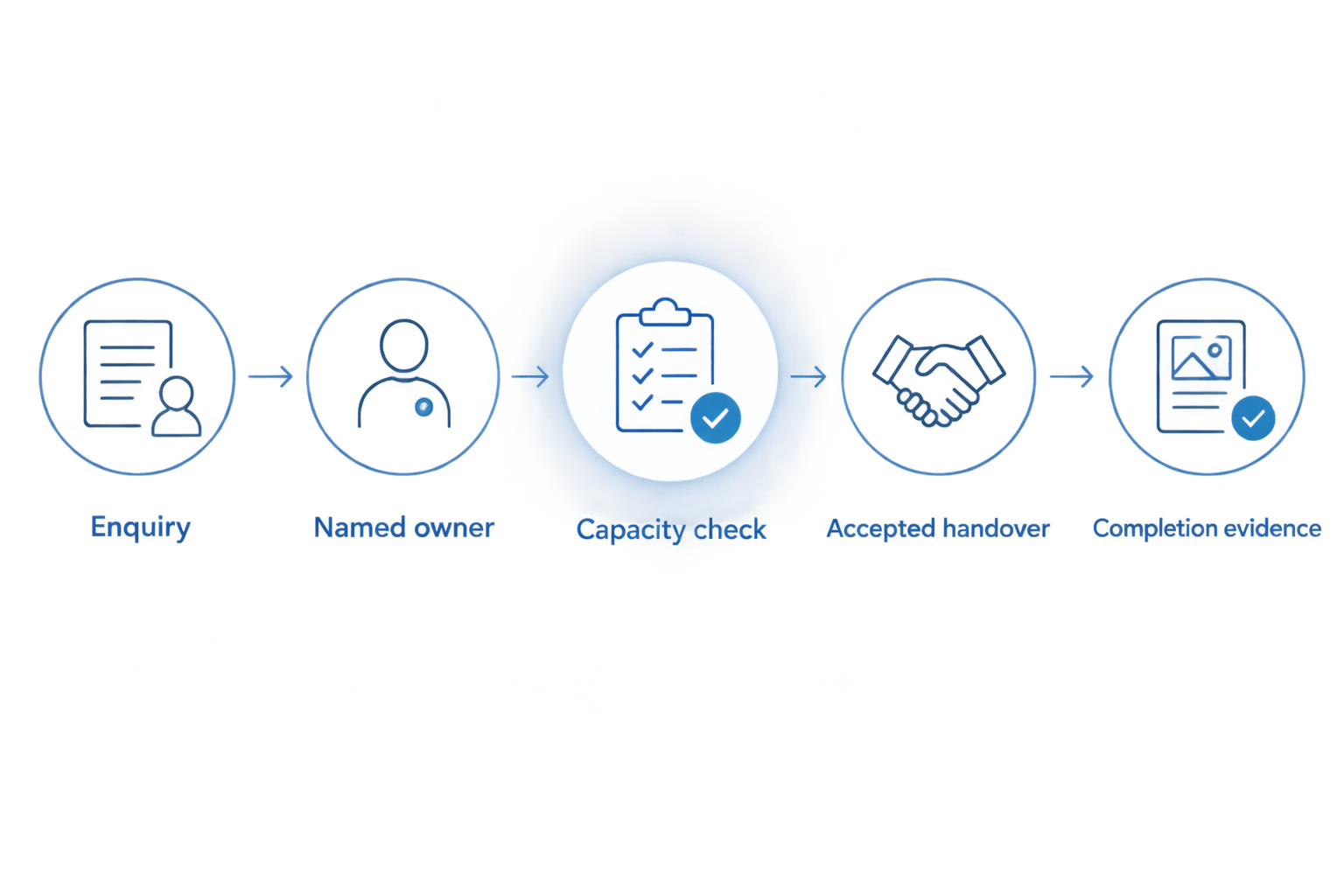
Confirm capacity and acceptance before treating a sales handover as complete.
Escalate exceptions, not every update
Configure an overdue check that evaluates the deadline, current status and responsible person. Send the first exception to the person who can resolve it. Escalate to the team leader when the agreed recovery window expires or the issue exceeds delegated authority.
Include the record reference, missed action, customer impact and required decision. A message saying a task is late gives the recipient less to act on than an exception explaining that tomorrow's booking still lacks an accepted delivery owner.
Keep routine completion messages out of the owner's inbox. The owner should see decisions requiring owner authority, not a running commentary on normal work.
Testing and review
Prove the workflow before expanding it
- Create 5 test records covering a normal enquiry, an unmatched enquiry, an unavailable assignee, a capacity conflict and an overdue action. Use clearly marked test data rather than live customer commitments.
- Run each record through the relevant stages. Check assignment, task creation, deadlines, acceptance and escalation against the written rules.
- Change the record owner during a test. Confirm whether existing tasks move, remain assigned or require an explicit reassignment action.
- Repeat the triggering update. Confirm that it does not create duplicate open tasks for the same action.
- Record defects and retest them before applying the workflow to live enquiries. Nominate someone responsible for future rule changes.
Expected result: Your team can demonstrate the normal path and the exception paths without relying on memory or owner intervention.
For the 2026 rollout, begin with a 15-minute daily review of unassigned records, overdue next actions and blocked handovers. That duration is a suggested meeting limit, not a performance claim. Discuss exceptions and decisions; do not read every record aloud.
Variant: update accountability when a record changes
New enquiries are only part of the process. An existing customer can change scope, a quoting lead can take leave, or a booking can move after delivery has accepted it.
- Choose specific changes that require action, such as owner reassignment, a revised booking date or a return to an earlier stage.
- Define whether the change should update an existing task, cancel an obsolete action or create a genuinely new responsibility.
- Use the customer record's unique identifier to connect related tasks where your systems support it. Match on the relevant action as well, so separate responsibilities remain separate.
- Require a reason when reopening completed work. Retain the original completion evidence and record what changed.
Expected result: The next action reflects the current commitment without erasing the history of who did what.
In a 2026 operating review, trace the customer commitment through sales, delivery and completion—not just the automation event. A repeatable revenue process depends on consistent operational handovers as well as enquiry capture; a sales record marked complete does not establish that delivery accepted the work.
Troubleshooting
Records move, but tasks stay with the previous person
Record ownership and task assignment are being handled separately. Add an explicit reassignment rule where supported, or require the coordinator to reassign outstanding actions during the handover. Retest both the record and its linked tasks.
The same action appears repeatedly
The trigger is responding to repeated updates without checking existing work. Restrict it to the relevant change and check for an existing open action before creating another. Keep the duplicate-prevention rule specific enough to allow genuinely different tasks.
Deadlines expire outside working hours
The due-date rule is using elapsed time rather than your intended working-hours policy. Review the timezone, weekends, leave cover and deadline calculation. If business-hour calculations are unsupported, use a documented manual deadline check rather than presenting elapsed hours as staffed response time.
Staff complete tasks without evidence
The completion definition is too loose or the evidence requirement is impractical. Specify an observable outcome, such as a recorded customer response or accepted handover. Where the system cannot enforce evidence, include a review check instead of assuming the field is mandatory.
Every exception still reaches the owner
The team lacks either decision authority or an effective escalation owner. Separate missing information, capacity decisions and commercial exceptions, then assign each to someone authorised to resolve it. Adding another owner notification preserves the bottleneck.
Customise your workflow
Once the first process works, extend the same responsibility rules to quote follow-up, delivery changes and customer complaints. Do not copy deadlines blindly: an urgent booking issue and a routine quote follow-up need different operating rules.
Connect marketing review to delivery review. If suitable enquiries are waiting because quoting capacity is full, assess that constraint before increasing campaign activity. If delivery has room but enquiries fail qualification, review targeting, offer and intake criteria rather than asking staff to chase harder.
Use the team capacity bottlenecks guide to frame that discussion around the work your team can accept and deliver.
Elevatory's done-with-you model fits owners who need help connecting responsibilities, systems and marketing decisions. It is not a substitute for an internal person owning the workflow. Agree who maintains the rules, checks exceptions and trains new staff before adding further automation.
For your next 2026 review, track unassigned work, overdue actions, rejected handovers and decisions requiring the owner. Define each measure consistently before comparing periods. Treat improvement as something to verify, not something the CRM guarantees.
FAQ
What is a CRM to team accountability workflow?
A CRM to team accountability workflow connects customer records to named responsibilities, next actions, deadlines and completion evidence. It also defines who resolves exceptions when work stalls or changes hands.
Can I build this workflow without buying another task system?
Yes, if your existing CRM supports the tasks, assignment rules and reporting your process needs. Confirm those capabilities before adding another system and another handover to maintain.
Who should own a customer record when several people work on it?
Assign one person accountability for progressing the current stage, while recording separate owners for distinct delivery tasks. Document when responsibility transfers and require the receiving person to accept it.
What should happen when an assigned employee is away?
Route work through a documented cover arrangement with a named replacement. Check outstanding tasks as well as new enquiries, because changing record ownership does not establish that existing tasks have moved.
Should every overdue task notify the business owner?
No. Send routine exceptions to the responsible person or team leader, and reserve owner escalation for decisions outside delegated authority. Otherwise, automation keeps the owner involved in daily coordination.
How does team accountability connect to marketing?
Team accountability shows who handles enquiries and whether the business can fulfil the commitments marketing generates. Review lead quality, quoting capacity and accepted delivery work together before deciding that more enquiries are the priority.
Can Elevatory help with systems as well as marketing?
Elevatory provides business coaching and done-with-you marketing implementation across offers, funnels, paid advertising and systems strategy. Your team still needs to participate in implementation and own daily execution.
One last thing
Test whether the workflow works without your inbox. During a supervised test, keep yourself out of routine assignment and handover decisions while remaining available for genuine exceptions. Every routine decision that returns to you identifies a missing rule, missing authority or missing responsibility.
Make that your final 2026 acceptance check. A workflow that creates tasks but still needs you to interpret each one has digitised owner dependence, not removed it.
Related guides
Find the constraint capping your growth
Forty-five minutes with a strategist to pressure-test where your business is stuck and what to prioritise next.
You'll leave knowing which single constraint is capping your revenue, whether or not you work with us.
Prefer to talk first? Call 1300 634 230 or email chris@elevatory.com.au